(RA4) Multi-Zone Multi-Server Architecture Explained
Every previous architecture in the Kasm progression solves for resilience within a single region. RA4 answers a different question: what happens when the users themselves are distributed across the globe?
That question exposes a problem that no amount of single-region redundancy can resolve. Control plane traffic, which includes authentication, session provisioning, and policy evaluation, must flow to wherever the Kasm Web App and its database reside. Session plane traffic, the live pixel stream that constitutes the user's workspace experience, is sensitive to round-trip latency between the user and the infrastructure relaying it.
In a single-region deployment, both types of traffic travel to the same place. For a user on the other side of the world, this is the source of a degraded experience that no configuration change can fix, because the underlying problem is the speed of light across fiber.
RA4 resolves this problem by separating the two planes geographically. The control plane remains centralized in a primary region. The session plane is distributed to secondary regions physically close to the users they serve. A user in London authenticates through the central control plane and then receives a session stream from infrastructure in London. The authentication adds a one-time latency cost. The session itself runs at local speeds.
Every component placement, every load balancer, every zone definition, and every DNS record in RA4 is an expression of this single organizing idea: separate the control plane from the session plane so each can be optimized independently.
Reference Architecture 4
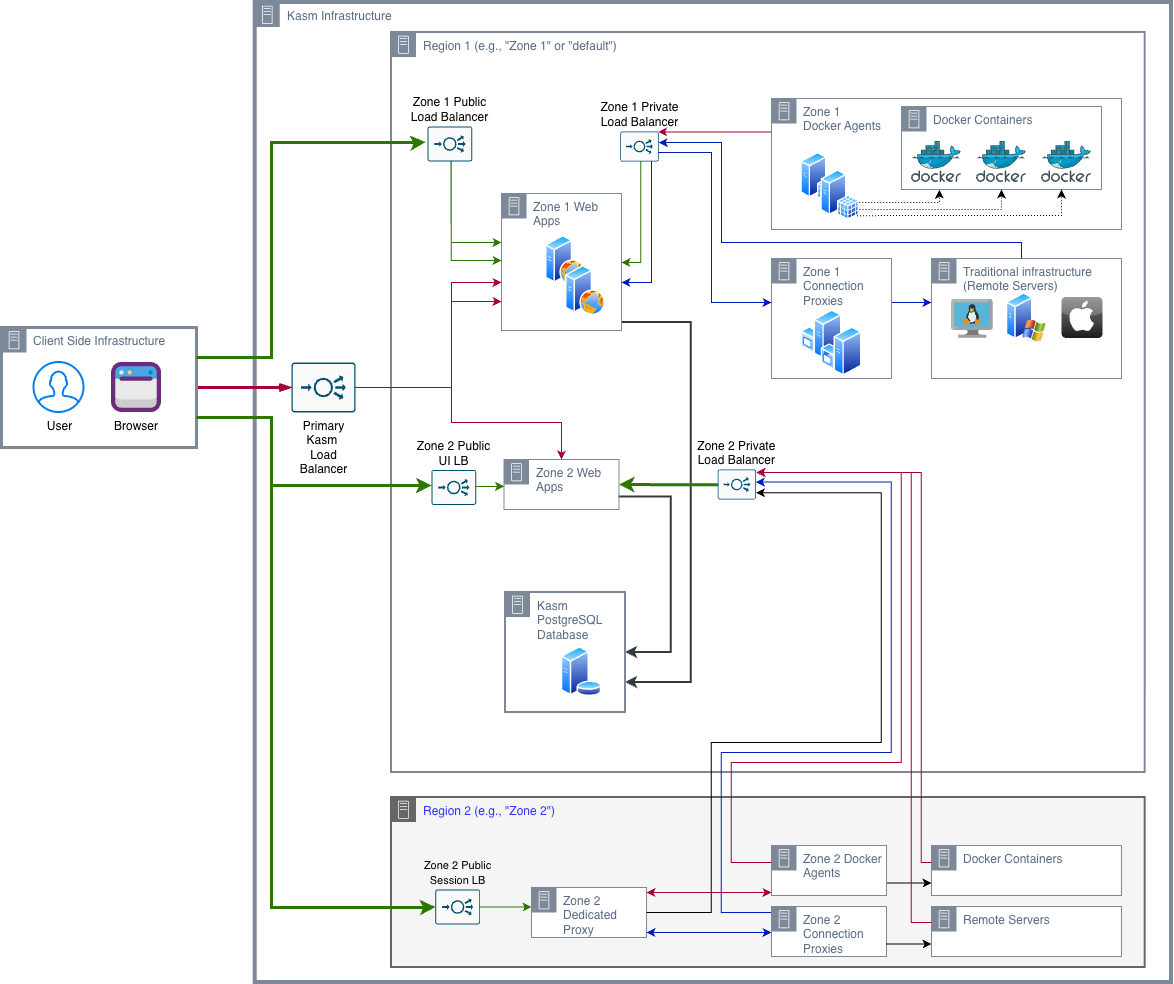
The Primary Load Balancer
Each Kasm Web App role includes an NGINX container kasm_proxy that serves as a required front-end to internal services. While this component is integral to system operation, organizations may enhance their security posture by either hardening this configuration or deploying Kasm Workspaces behind an enterprise-grade reverse proxy or load balancer.
Enterprise security solutions can provide advanced protections such as Web Application Firewall (WAF) capabilities, DDoS mitigation, and Zero Trust access controls. Additionally, SSL/TLS offloading can centralize traffic management and reduce processing overhead on backend Kasm services, improving both performance and resource efficiency.
All user interactions, authentication, session initiation, and workspace streaming enter the environment through a single public endpoint, the Primary Load Balancer. This abstraction presents the deployment as a unified service, regardless of the underlying multi-node architecture.
A critical requirement of the Primary Load Balancer is continuous backend health awareness. The Kasm Web App exposes a /api/__healthcheck endpoint that verifies both application availability and database connectivity. If a Web App instance becomes unable to reach the database, it is automatically marked unhealthy and removed from traffic routing.
For production deployments, a network load balancer is the recommended approach. Unlike DNS round-robin, which relies on TTL expiration and may continue routing traffic to failed nodes for 90–300 seconds, a network load balancer performs active health checks and reroutes traffic to healthy instances within seconds, ensuring higher availability and a more reliable user experience.
Private Load Balancer
One of the subtler architectural decisions is the use of a separate private load balancer within each zone. The private load balancer is positioned between the Web App and Dedicated Proxy nodes on one side, and the Agent and Connection Proxy nodes on the other.
This design establishes an internal routing path for control-plane traffic, ensuring it remains within the private network. As a result, control traffic does not traverse the external load balancer interface, improving both efficiency and security.
The Two-Region Structure
The RA4 diagram shows two distinct geographic regions. Understanding how they differ structurally is the key to understanding the architecture.
Region 1 is the primary region. It hosts the control plane for all zones: the Web App nodes for Zone 1 and Zone 2 all reside here, along with the PostgreSQL database. Region 1 also hosts Zone 1's session infrastructure, because Zone 1 users are geographically local and do not benefit from session plane distribution.
Region 2 is the secondary region. It is structurally identical. It hosts a Dedicated Zone Proxy, Docker Agents, and Connection Proxies for legacy protocol connections. It does not host a Web App instance or any database infrastructure.
Note: The placement of all zones' Web App nodes inside Region 1 is one of the most architecturally significant decisions in RA4, and one that surprises architects who expect each zone to have its own independent control plane. The reason is the database dependency: a Web App instance in Region 2 querying a database in Region 1 would add 80 to 120 milliseconds to every query, compounding across multiple sequential queries per interaction to produce multi-second control plane latency. This is structurally unacceptable regardless of available bandwidth between regions.
Why All Web App Instances Live in Region 1
The Web App role issues synchronous, blocking database queries for every user interaction. Authentication requires a database lookup. Session provisioning requires a database write. Policy evaluation requires a database read. These operations cannot tolerate cross-continental database latency.
The solution RA4 adopts is to accept the one-time latency cost of control plane traffic for users in remote regions, while eliminating the sustained latency cost of session traffic by routing it to regional infrastructure. The one-time authentication latency is noticeable but not disruptive. Sustained session latency is directly experienced as lag in every keystroke and mouse movement.
The Dedicated Zone Proxy
The Dedicated Zone Proxy is the component that makes RA4 possible. It is a session relay; it accepts WebSocket connections from users' browsers and relays the session stream to the appropriate Agent. The Dedicated Proxy does not provision sessions (that is the Web App's job), does not authenticate users (that is the database's job via the Web App), and does not run workspaces (that is the Agent's job). It does exactly one thing: relay the session stream between the user and the Agent, at regional proximity.
The Dedicated Proxy’s only responsibility is to relay session traffic between the user and the Agent or Connection Proxy at regional proximity.
The Dedicated Proxy does not provision sessions (that is the Web App's job), does not authenticate users (that is the database's job via the Web App), and does not run workspaces (that is the Agent's job). It does exactly one thing: relay the session stream between the user and the Agent, at regional proximity.
The token validation step, where the Dedicated Proxy contacts the Web App's Upstream Auth Address to verify the session token, is the one moment during session streaming where Region 2 touches Region 1. It happens once at session connection time, not continuously during the session. After validation, the session stream runs entirely within Region 2's infrastructure. This is why the Upstream Auth Address zone setting is so critical in RA4. It tells the Dedicated Zone Proxy in Region 2 where to send token validation requests. It must resolve to the Region 1 Web App load balancer's public address — not an internal IP, not a single Web App server hostname. If any Web App instance in the HA cluster fails, the Upstream Auth Address should continue resolving to the load balancer, which routes validation requests to remaining healthy instances.
Warning: The Upstream Auth Address zone setting is critical in RA4. It must resolve to the Region 1 Web App load balancer's public address, not an internal IP and not a single Web App server hostname. If any Web App instance in the HA cluster fails, the Upstream Auth Address should continue resolving to the load balancer, which routes validation requests to remaining healthy instances.
Search Alternate Zones and Regional Failure
The Search Alternate Zones setting governs what happens when a regional zone loses capacity entirely. For RA4 deployments where zones represent geographic preferences, this means a Region 2 capacity failure results in Region 2 users receiving sessions from Region 1 or Region 3 with higher latency, rather than a hard failure.
For deployments where zones represent compliance or tenant isolation boundaries, this setting must be disabled. A zone boundary representing a PCI-scoped network segment or a classified enclave must not be crossed during overflow routing. A capacity error is the correct behavior when the alternative is a silent boundary violation.
Database Tier Resilience
A database failure is a global platform failure.
| Approach | RPO | Failover |
|---|---|---|
| Managed HA (RDS Multi-AZ, Azure Flexible HA) | Near-zero | Automatic (~60 seconds) |
| Self-managed Patroni | Near-zero | Automatic |
| Cross-region async replica | Minutes (replication lag) | Manual promotion |
Intra-Zone Resilience
Each zone follows the same HA patterns as RA3 component tiers.
| Zone Component | Minimum | Failure Impact |
|---|---|---|
| Dedicated Proxy nodes | 2 behind internal LB | One fails: active sessions on that proxy lost; others continue |
| Agent nodes | 2+ | One fails: sessions on that Agent lost; new sessions use healthy Agents |
| Connection Proxy nodes | 2 | One fails: legacy sessions lost; new sessions route to healthy proxy |
Dedicated Proxy nodes are lightweight (kasm_proxy only, no DB or container runtime) and economical to deploy in pairs.
RA4 HA Summary
| Failure Scenario | Impact | Recovery |
|---|---|---|
| One Web App node fails | Brief management disruption; session streams unaffected | Automatic: LB routes around it |
| Database fails (managed HA) | ~60 second platform unavailability | Automatic promotion |
| One zone's Dedicated Proxy fails | Active sessions on that proxy lost; zone remains functional | Automatic: LB routes to remaining proxies |
| Complete zone failure | Zone users lose sessions; all other zones unaffected | Zone users reassignable to another zone if policy permits |
| Central Web App region fails | All zones lose auth and session launch | Requires secondary cluster or recovery from backup |
Operational Complexity
RA4 is the most operationally complex Kasm architecture. Treat these as deployment prerequisites, not post-deployment enhancements.
| Requirement | Why |
|---|---|
| Centralized observability with zone-tagged logs and metrics | Zone-specific failures appear as intermittent global problems without zone tagging |
| Automated certificate management | A certificate expiry in one zone causes a zone-scoped outage; wildcard certs plus automation prevent this |
| Per-zone configuration documentation | Each zone's six settings must be documented and version-controlled independently |
| Image pre-loading across all zone Agents | Staggered image cache state causes zone-specific workspace launch failures |
| WAN path monitoring | Upstream Auth reliability from each remote zone to the central cluster must be actively monitored |
When to Use RA4
| Requirement | RA4 Capability |
|---|---|
| Users in multiple regions requiring regional session proximity | Zone-specific Dedicated Proxy and Agent nodes deliver regional streaming |
| Data residency: session compute must stay within a geographic boundary | Zone-per-region with Agents restricted to compliant infrastructure |
| Regional failure must not cause a global outage | Zone isolation: zone failure is regional degradation only |
| Single global administrative interface | Central Web App cluster manages all zones from one console |
| Scaling from RA3 with proven multi-server operations | RA4 extends RA3; existing central infrastructure is unchanged |
This document completes the Kasm Workspaces Reference Architecture series. Return to the Planning and Design Concepts document for the foundational concepts underlying all four reference architectures.