Manual Intel or AMD GPU configuration
As of Kasm Workspaces version 1.19.0, it is no longer necessary to manually pass through Intel and AMD GPUs; they are detected automatically and managed in the UI. If using an NVIDIA GPU, please see GPU Acceleration.
Intel and AMD GPUs are automatically detected by the Kasm Agent service and will show up in the agent details in the UI. Navigate to Infrastructure -> Docker Agents and click Edit on the target agent. From here you can enable/disable features of each GPU. Disabling a feature means that feature will not be used by user session containers.

After confirming that your GPU shows up on the Agent details view, you can test using the GPU on a Workspace. Navigate to Workspaces -> Workspaces and Edit the target workspace. Scroll down to the GPU Hardware section.
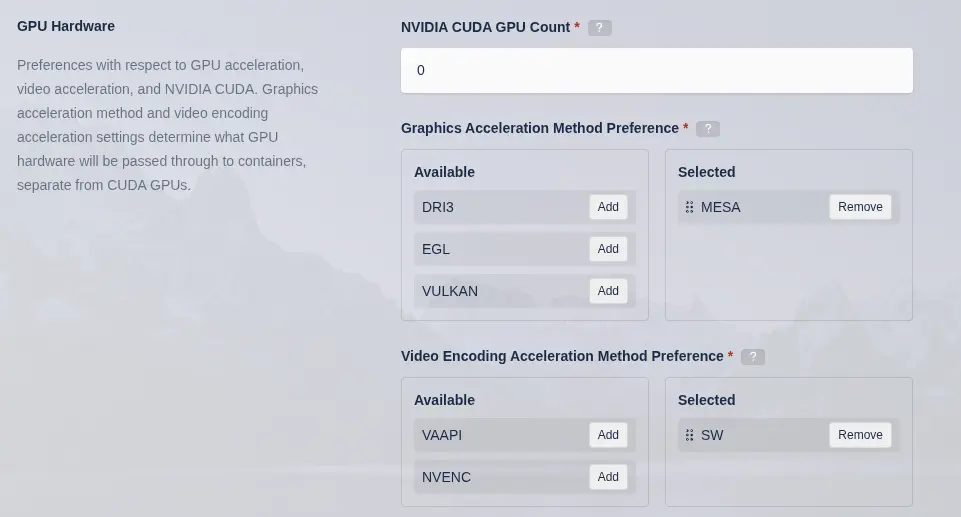
Kasm Workspace Images must be on version 1.19.0 or higher to support automatic configuration of graphics and video acceleration covered below.
For graphics acceleration, Intel and AMD GPUs generally support DRI3, EGL, and VULKAN. KasmVNC natively supports DRI3
and does not require the use of a translation layer, therefore, it is the preferred method for Intel and AMD GPUs.
EGL uses VirtualGL and Vulkan uses Zink as a translation layer. Regardless of which option you pick, Kasm handles
the configuration of the container to use the selected method and passes through the appropriate device. If the
agent has multiple compatible GPUs for the selected method, a GPU is selected at random and passed through to the
container. If you do not want a specific GPU to be used for graphics, you can disable graphics on that GPU in
the Kasm Agent settings covered above. The MESA option means to use the llvmpipe software-based GPU. Kasm will attempt to use compatible hardware according to the order of graphics acceleration methods in the Selected list, which may be re-ordered by the admin.
KasmVNC supports VAAPI for hardware accelerated h.264 and h.265 video encoding of the session stream. Selecting VAAPI
for video acceleration will pass through the appropriate DRM device. KasmVNC will automatically detect and use that
hardware for encoding if the user selects it. The SW option means to use software based encoding and it is recommended
to leave that option in the list as a fallback. This Selected list of video acceleration methods may also be re-ordered and determines the order in which Kasm attempts to use compatible hardware. See the Kasm Performance
page for more details.