Single Server Installation
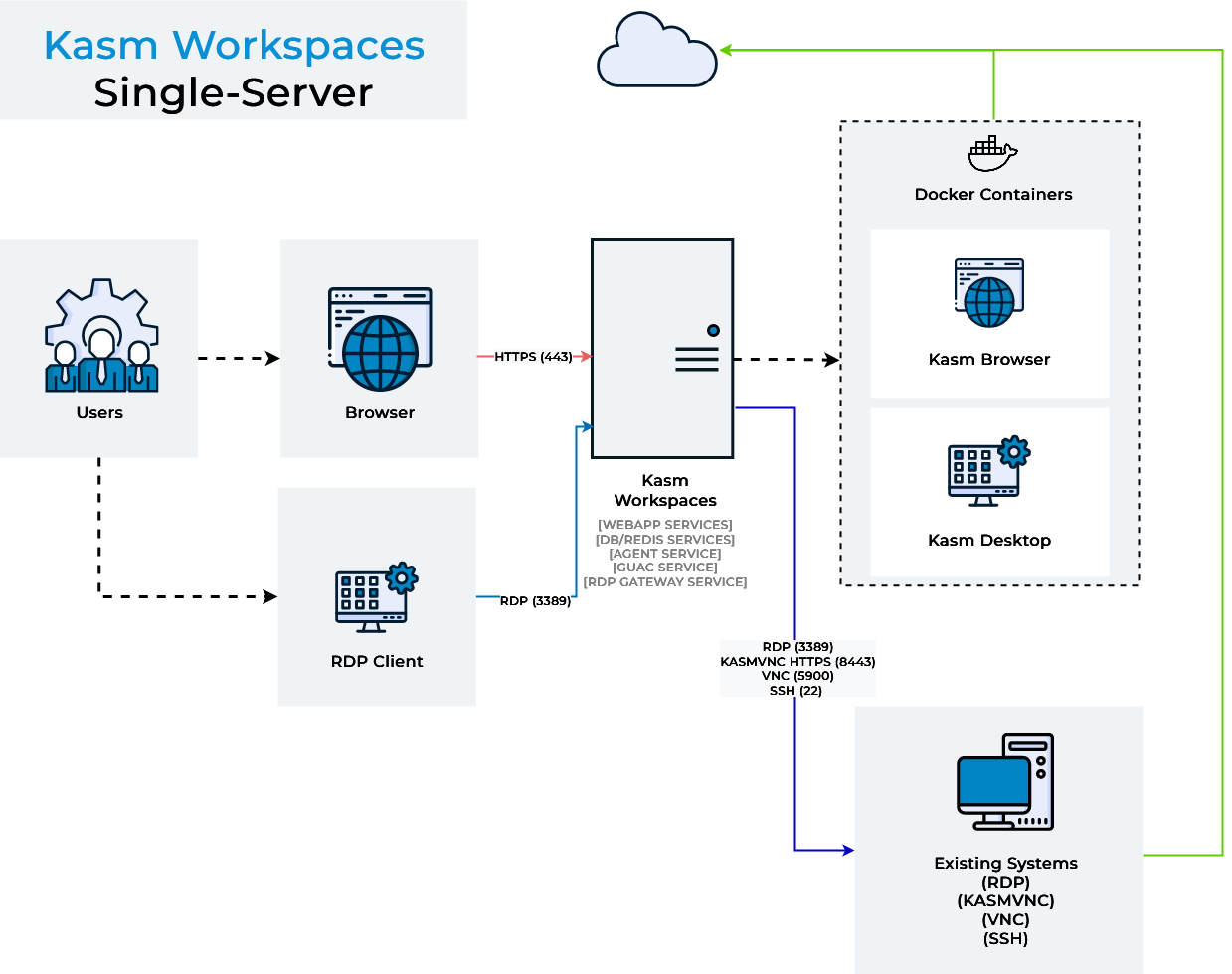
The simplest way to deploy Kasm Workspaces is to install all application services on a single server. End-user sessions will also be provisioned on this server. All interior docker communication occurs within the single server and there are no special configurations required.
Please read through the entire process before getting started.
For help please see Help and Support.
Ports and Protocols
In the Single Server configurations all services communicate via internal docker networks. Only access to the Web Application and port 3389 for RDP gateway access (if desired) needs to be exposed.
| Source | Destination | Port | Notes |
|---|---|---|---|
| End User | Kasm Workspaces | 443 | Web Application |
| End User | Kasm RDP Gateway | 3389 | RDP Thick Client Access |
Installation Guide
Please review the System Requirements before beginning.
Kasm provides a Sizing and Deployment Guide to aid in determining hardware specifications for large scale deployments.
- Download the latest version of Kasm Workspaces to
/tmp - Extract the package and run the installation script.
Install Files
| Contents | URL | SHA256 |
|---|---|---|
| Installer Bundle | https://kasm-static-content.s3.amazonaws.com/kasm_release_1.19.0.tar.gz | 7b801cb0579a7867df46b6da873fe8dd631db07d4c05349e5bd1aea27130c37d |
| Contents | URL | SHA256 |
|---|---|---|
| Services | https://kasm-static-content.s3.amazonaws.com/kasm_release_service_images_amd64_1.19.0.tar.gz | c8697a7d6db6d6c2cd685cf431977e79bb4adfa35d91d6fab455e70f4441e46d |
| Workspaces | https://kasm-static-content.s3.amazonaws.com/kasm_release_workspace_images_amd64_1.19.0.tar.gz | 2338ed95653cf37b41c32c4202c38b507fd94a745dc81a303402e20f292486da |
| Network Plugin | https://kasm-static-content.s3.amazonaws.com/kasm_release_network_plugin_images_amd64_1.5.tar.gz | bd13ce71737cebf2e7559c01c2dbff657a52505c771fce450a32bed36ef3056d |
| Logging Plugin | https://kasm-static-content.s3.amazonaws.com/kasm_release_logging_plugin_images_amd64_1.1.tar.gz | fe5d1d6d1acd42ea89e15e375d0d6719f9d6cbf1f9c6943c4fda901a3d529135 |
| Contents | URL | SHA256 |
|---|---|---|
| Services | https://kasm-static-content.s3.amazonaws.com/kasm_release_service_images_arm64_1.19.0.tar.gz | f7975cecf89fc5b1e3886c09178047e7d6f092344ab15f9babfdeaeeb8d01801 |
| Workspaces | https://kasm-static-content.s3.amazonaws.com/kasm_release_workspace_images_arm64_1.19.0.tar.gz | 5ee92ebac22c7399694c9a7eef4d0baddc98c315c2d78848fa3a757d66bcd2c4 |
| Network Plugin | https://kasm-static-content.s3.amazonaws.com/kasm_release_network_plugin_images_arm64_1.5.tar.gz | 59d23f6765f26be86a00fed31b38873d36f9b7b7ecf608a2efb270d969621ae6 |
| Logging Plugin | https://kasm-static-content.s3.amazonaws.com/kasm_release_logging_plugin_images_arm64_1.1.tar.gz | 1d720994c141fe9743b566ea2affeee77759e272ad777d0257ed6a089dd3b802 |
- Standard Install
- Offline Install x86-64
- Offline Install arm64
- Rolling
- Initial Build
cd /tmp \
&& curl --fail-early \
    -fO https://kasm-static-content.s3.amazonaws.com/kasm_release_1.19.0-latest.tar.gz \
    -fO https://kasm-static-content.s3.amazonaws.com/kasm_release_1.19.0-latest.tar.gz.sha256sum \
&& sha256sum --check *.sha256sum \
&& tar -xf kasm_release_1.19.0-latest.tar.gz \
&& sudo bash kasm_release/install.sh
cd /tmp \
&& curl --fail-early \
    -fO https://kasm-static-content.s3.amazonaws.com/kasm_release_1.19.0.tar.gz \
    -fO https://kasm-static-content.s3.amazonaws.com/kasm_release_1.19.0.tar.gz.sha256sum \
&& sha256sum --check *.sha256sum \
&& tar -xf kasm_release_1.19.0.tar.gz \
&& sudo bash kasm_release/install.sh --use-static-images
- Rolling
- Initial Build
cd /tmp \
&& curl --fail-early \
    -fO https://kasm-static-content.s3.amazonaws.com/kasm_release_1.19.0-latest.tar.gz \
    -fO https://kasm-static-content.s3.amazonaws.com/kasm_release_1.19.0-latest.tar.gz.sha256sum \
    -fO https://kasm-static-content.s3.amazonaws.com/kasm_release_service_images_amd64_1.19.0-latest.tar.gz \
    -fO https://kasm-static-content.s3.amazonaws.com/kasm_release_service_images_amd64_1.19.0-latest.tar.gz.sha256sum \
    -fO https://kasm-static-content.s3.amazonaws.com/kasm_release_workspace_images_amd64_1.19.0-latest.tar.gz \
    -fO https://kasm-static-content.s3.amazonaws.com/kasm_release_workspace_images_amd64_1.19.0-latest.tar.gz.sha256sum \
    -fO https://kasm-static-content.s3.amazonaws.com/kasm_release_network_plugin_images_amd64_1.5-latest.tar.gz \
    -fO https://kasm-static-content.s3.amazonaws.com/kasm_release_network_plugin_images_amd64_1.5-latest.tar.gz.sha256sum \
    -fO https://kasm-static-content.s3.amazonaws.com/kasm_release_logging_plugin_images_amd64_1.1-latest.tar.gz \
    -fO https://kasm-static-content.s3.amazonaws.com/kasm_release_logging_plugin_images_amd64_1.1-latest.tar.gz.sha256sum \
&& sha256sum --check *.sha256sum \
&& tar -xf kasm_release_1.19.0-latest.tar.gz \
&& sudo bash kasm_release/install.sh --offline-workspaces /tmp/kasm_release_workspace_images_amd64_1.19.0-latest.tar.gz --offline-service /tmp/kasm_release_service_images_amd64_1.19.0-latest.tar.gz --offline-network-plugin /tmp/kasm_release_network_plugin_images_amd64_1.5-latest.tar.gz --offline-logger-plugin /tmp/kasm_release_logging_plugin_images_amd64_1.1-latest.tar.gz
cd /tmp \
&& curl --fail-early \
    -fO https://kasm-static-content.s3.amazonaws.com/kasm_release_1.19.0.tar.gz \
    -fO https://kasm-static-content.s3.amazonaws.com/kasm_release_1.19.0.tar.gz.sha256sum \
    -fO https://kasm-static-content.s3.amazonaws.com/kasm_release_service_images_amd64_1.19.0.tar.gz \
    -fO https://kasm-static-content.s3.amazonaws.com/kasm_release_service_images_amd64_1.19.0.tar.gz.sha256sum \
    -fO https://kasm-static-content.s3.amazonaws.com/kasm_release_workspace_images_amd64_1.19.0.tar.gz \
    -fO https://kasm-static-content.s3.amazonaws.com/kasm_release_workspace_images_amd64_1.19.0.tar.gz.sha256sum \
    -fO https://kasm-static-content.s3.amazonaws.com/kasm_release_network_plugin_images_amd64_1.5.tar.gz \
    -fO https://kasm-static-content.s3.amazonaws.com/kasm_release_network_plugin_images_amd64_1.5.tar.gz.sha256sum \
    -fO https://kasm-static-content.s3.amazonaws.com/kasm_release_logging_plugin_images_amd64_1.1.tar.gz \
    -fO https://kasm-static-content.s3.amazonaws.com/kasm_release_logging_plugin_images_amd64_1.1.tar.gz.sha256sum \
&& sha256sum --check *.sha256sum \
&& tar -xf kasm_release_1.19.0.tar.gz \
&& sudo bash kasm_release/install.sh --use-static-images --offline-workspaces /tmp/kasm_release_workspace_images_amd64_1.19.0.tar.gz --offline-service /tmp/kasm_release_service_images_amd64_1.19.0.tar.gz --offline-network-plugin /tmp/kasm_release_network_plugin_images_amd64_1.5.tar.gz --offline-logger-plugin /tmp/kasm_release_logging_plugin_images_amd64_1.1.tar.gz
- Rolling
- Initial Build
cd /tmp \
&& curl --fail-early \
    -fO https://kasm-static-content.s3.amazonaws.com/kasm_release_1.19.0-latest.tar.gz \
    -fO https://kasm-static-content.s3.amazonaws.com/kasm_release_1.19.0-latest.tar.gz.sha256sum \
    -fO https://kasm-static-content.s3.amazonaws.com/kasm_release_service_images_arm64_1.19.0-latest.tar.gz \
    -fO https://kasm-static-content.s3.amazonaws.com/kasm_release_service_images_arm64_1.19.0-latest.tar.gz.sha256sum \
    -fO https://kasm-static-content.s3.amazonaws.com/kasm_release_workspace_images_arm64_1.19.0-latest.tar.gz \
    -fO https://kasm-static-content.s3.amazonaws.com/kasm_release_workspace_images_arm64_1.19.0-latest.tar.gz.sha256sum \
    -fO https://kasm-static-content.s3.amazonaws.com/kasm_release_network_plugin_images_arm64_1.5-latest.tar.gz \
    -fO https://kasm-static-content.s3.amazonaws.com/kasm_release_network_plugin_images_arm64_1.5-latest.tar.gz.sha256sum \
    -fO https://kasm-static-content.s3.amazonaws.com/kasm_release_logging_plugin_images_arm64_1.1-latest.tar.gz \
    -fO https://kasm-static-content.s3.amazonaws.com/kasm_release_logging_plugin_images_arm64_1.1-latest.tar.gz.sha256sum \
&& sha256sum --check *.sha256sum \
&& tar -xf kasm_release_1.19.0-latest.tar.gz \
&& sudo bash kasm_release/install.sh --offline-workspaces /tmp/kasm_release_workspace_images_arm64_1.19.0-latest.tar.gz --offline-service /tmp/kasm_release_service_images_arm64_1.19.0-latest.tar.gz --offline-network-plugin /tmp/kasm_release_network_plugin_images_arm64_1.5-latest.tar.gz --offline-logger-plugin /tmp/kasm_release_logging_plugin_images_arm64_1.1-latest.tar.gz
cd /tmp \
&& curl --fail-early \
    -fO https://kasm-static-content.s3.amazonaws.com/kasm_release_1.19.0.tar.gz \
    -fO https://kasm-static-content.s3.amazonaws.com/kasm_release_1.19.0.tar.gz.sha256sum \
    -fO https://kasm-static-content.s3.amazonaws.com/kasm_release_service_images_arm64_1.19.0.tar.gz \
    -fO https://kasm-static-content.s3.amazonaws.com/kasm_release_service_images_arm64_1.19.0.tar.gz.sha256sum \
    -fO https://kasm-static-content.s3.amazonaws.com/kasm_release_workspace_images_arm64_1.19.0.tar.gz \
    -fO https://kasm-static-content.s3.amazonaws.com/kasm_release_workspace_images_arm64_1.19.0.tar.gz.sha256sum \
    -fO https://kasm-static-content.s3.amazonaws.com/kasm_release_network_plugin_images_arm64_1.5.tar.gz \
    -fO https://kasm-static-content.s3.amazonaws.com/kasm_release_network_plugin_images_arm64_1.5.tar.gz.sha256sum \
    -fO https://kasm-static-content.s3.amazonaws.com/kasm_release_logging_plugin_images_arm64_1.1.tar.gz \
    -fO https://kasm-static-content.s3.amazonaws.com/kasm_release_logging_plugin_images_arm64_1.1.tar.gz.sha256sum \
&& sha256sum --check *.sha256sum \
&& tar -xf kasm_release_1.19.0.tar.gz \
&& sudo bash kasm_release/install.sh --use-static-images --offline-workspaces /tmp/kasm_release_workspace_images_arm64_1.19.0.tar.gz --offline-service /tmp/kasm_release_service_images_arm64_1.19.0.tar.gz --offline-network-plugin /tmp/kasm_release_network_plugin_images_arm64_1.5.tar.gz --offline-logger-plugin /tmp/kasm_release_logging_plugin_images_arm64_1.1.tar.gz
Starting in 1.19.0, the default installation uses rolling images to deliver ongoing security fixes and updates. For static images with manual update control, pass the -f or --use-static-images argument during the installation or upgrade process.
sudo bash kasm_release/install.sh -f

or

sudo bash kasm_release/upgrade.sh -f
Refer to Rolling Image Management for more information about rolling images.
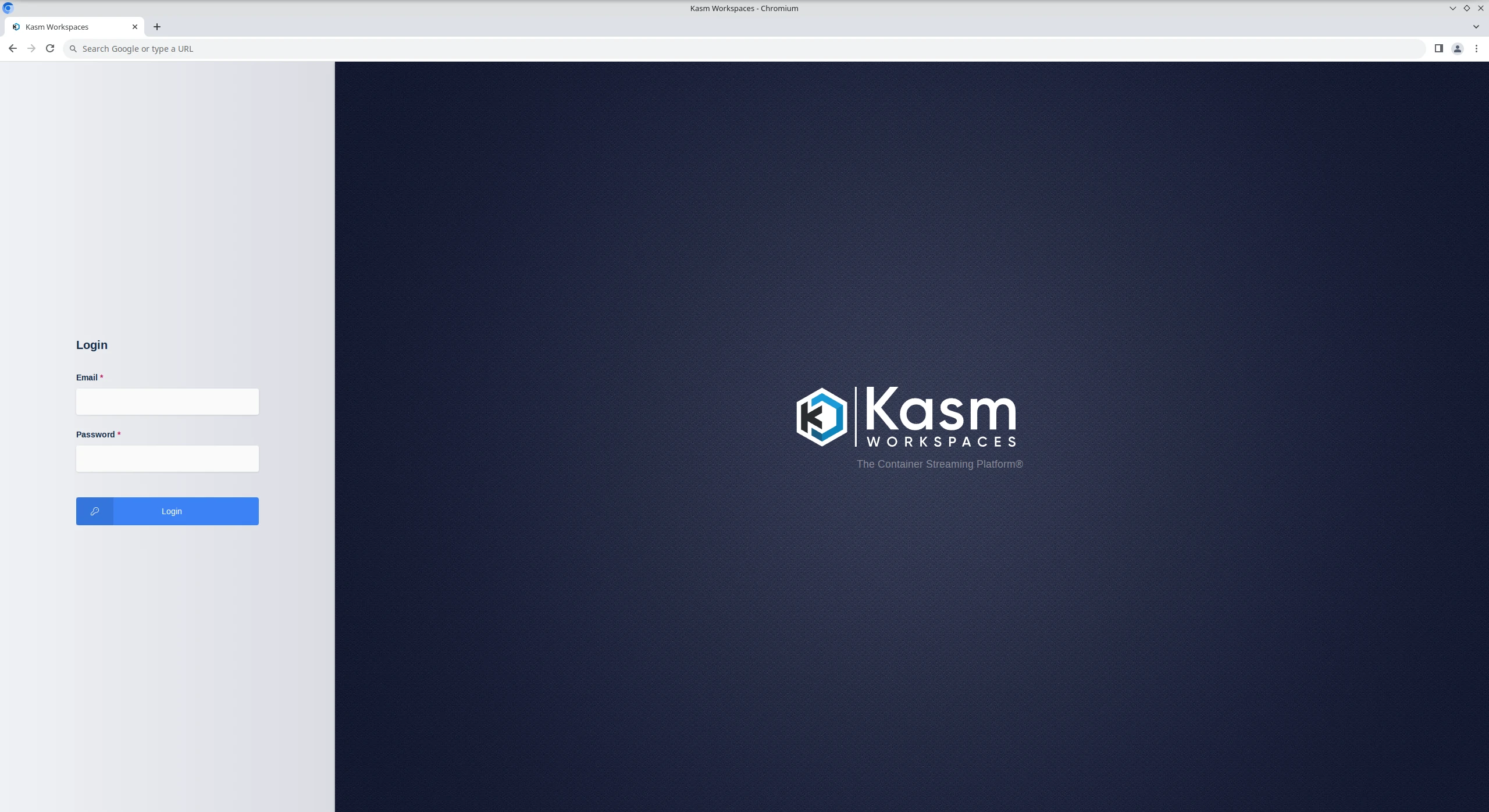
- Log into the Web Application running on port 443 at https://<WEBAPP_SERVER>
- The Default usernames are admin@kasm.local and user@kasm.local. The passwords will be randomly generated and presented at the end of the install unless the
--admin-passwordor/and--user-passwordare specified.
Licensing the server during install?
If you have an activation key it can be passed to the installation script and activation will be completed on your behalf as part of the install.
Create a file for the activation key e.g. activation_key.txt and paste in the activation key you received in your confirmation email.
When running the install.sh use the parameter -a or --activation-key-file so your command might look something like this sudo bash kasm_release/install.sh -a activation_key.txt.
This will not work with an offline air-gapped install, as Kasm Workspaces must contact an activation server to complete licensing your installation.
In a multi server install this option only applies to the database role.
Need to install Kasm on a different port?
If you would like to run the Web Application on a different port pass the -L flag when calling the installer.
e.g sudo bash kasm_release/install.sh -L 8443
All install options
| Flag | Description |
|---|---|
-v, --verbose | Verbose output |
-e, --accept-eula | Accept End User License Agreement |
-D, --no-start | Don't start services at the end of installation |
-W, --default-images | Seed and Download default Workspaces Images |
-L, --proxy-port | Default Proxy Listening Port (e.g., 8443 for HTTPS on alternate port) |
-U, --user-password | Default User Password |
-P, --admin-password | Default Admin Password |
-a, --activation-key-file | License Activation key file path |
-w, --offline-workspaces | Path to the tar.gz workspace images offline installer |
-s, --offline-service | Path to the tar.gz service images offline installer |
-x, --offline-network-plugin | Path to the tar.gz network plugin images offline installer |
--offline-logger-plugin | Path to the tar.gz logger plugin images offline installer |
-O, --use-rolling-images | Use rolling Workspaces images |
-f, --use-static-images | Use static version Workspaces images |
-A, --enable-lossless | Enable lossless streaming option |
-H, --no-swap-check | Disable check for swapfile |
-J, --swap-size | Create swap if none exists in megabytes (e.g., 4096) |
-B, --no-check-ports | Do not check for open ports |
-b, --no-check-disk | Do not check disk space |
-X, --skip-v4l2loopback | Skip v4l2loopback installation |
--skip-egress | Do not install egress network plugin or dependencies |
--enable-epel | Enable EPEL repo to install packages not in default RHEL repos. Required for WireGuard on RHEL/Rocky/AlmaLinux/Oracle 8 — pass this flag explicitly or respond y to the interactive prompt. |
--ignore-dep-failures | Continue installation even if optional dependencies fail to install |
--install-depends | Force dependency installation even during offline installs. Has no effect on online installs (deps always run by default). |
--ssl-public-cert | Copy the public SSL certificate from this path during install |
--ssl-private-key | Copy the private SSL key from this path during install |
Install Video Tutorial
This video walks through installing Kasm Workspaces on a single system.
Install troubleshooting
The install.sh script creates a log file as it runs, this file is removed upon completion of a successful installation.
However, if something does go wrong the logfile will be available from the directory the install.sh script was executed
from in the format kasm_install_${TIMESTAMP}.log. This file will be important for diagnosing the error that caused
the installation to fail and will be requested when submitting a support ticket with Kasm Technologies.
Kasm Technologies.