General Server Issues
-
Compatible Docker Version
Ensure the system is running compatible versions of
dockeranddocker compose. See System Requirements for more details. -
Cloud Security Groups
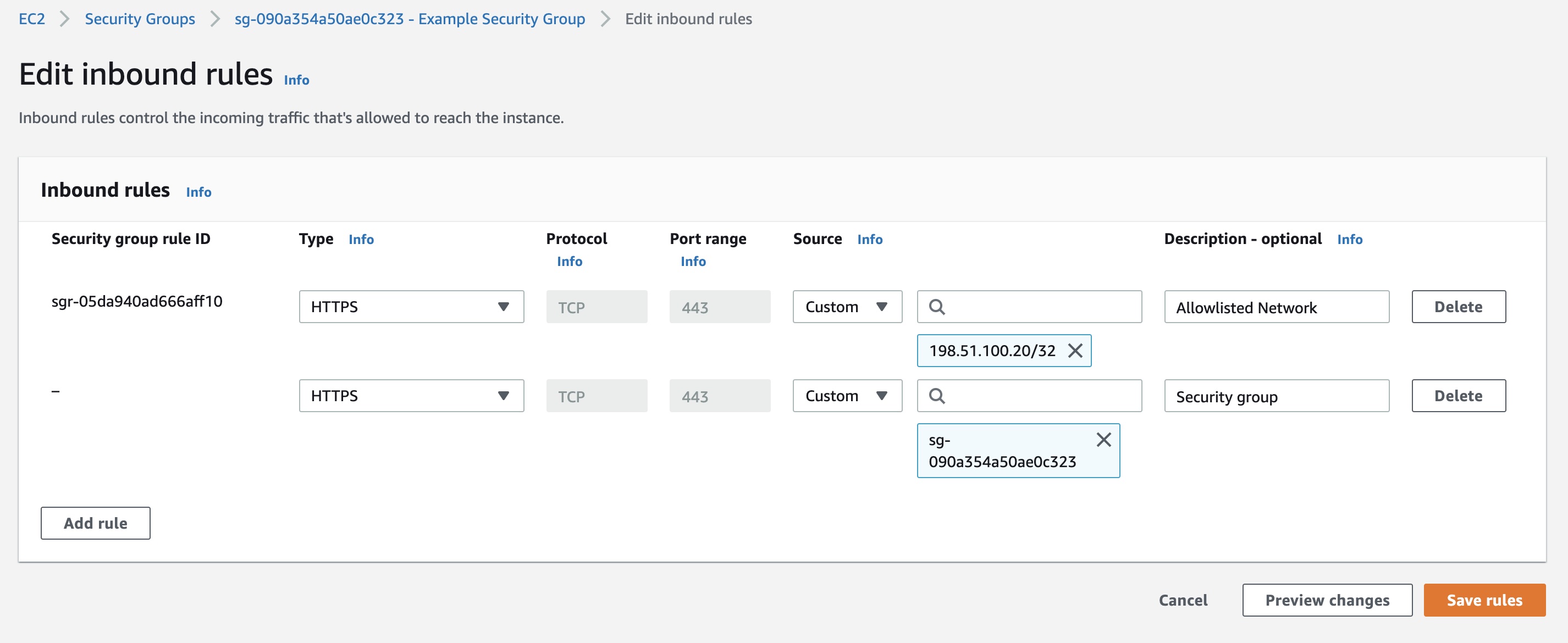
If the security group rule in the AWS / Azure / OCI console that allows https into the Web App restricts connections by IP address (the source IP is not "0.0.0.0/0"), then an additional rule must be added to allow the server to connect to itself.
This is done by creating an additional rule to the security group allowing https connections from the same security group.
Linux Server Workspaces
-
No audio in Linux (xrdp) sessions
No sound is heard in a session, and
pactl list sinks shortshows only a dummyauto_nullsink. On Ubuntu 24.04 and later, thepulseaudio-module-xrdppackage no longer exists, and xrdp audio support has moved to PipeWire (pipewire-module-xrdp). If the session is still running the legacy PulseAudio daemon, the PipeWire xrdp sink never loads and audio falls back toauto_null. Switch the session to PipeWire:sudo apt-get install -y pipewire pipewire-pulse wireplumber pipewire-audio alsa-utilssudo apt-get remove -y pulseaudiosudo systemctl --global enable pipewire.socket pipewire-pulse.socket wireplumber.serviceDisconnect and reconnect the session so that a fresh user session starts under PipeWire, then verify with
pactl info(which should reportPulseAudio (on PipeWire ...)) andpactl list sinks short(which should show an xrdp sink rather thanauto_null). Apply this fix in the golden image, or in a session-start or autoscale provisioning script, so that it persists across newly provisioned sessions. -
Web browser missing or "Input/output error" in a session
Clicking the browser icon does nothing, or it returns an
Input/output error; in some images the browser is not installed by default. Do not rely on the browser being present in the base image. Install it from the autoscale provisioning script or a session-start script instead. On Ubuntu 24.04, the snap-packaged Firefox frequently fails under xrdp, so prefer a.debbrowser such as Chromium, Chrome, or Firefox from the Mozilla PPA. A stale~/thinclient_drivesFUSE mount left over from a previous xrdp session can also cause anInput/output error; clear it withfusermount -u ~/thinclient_drives, or disable drive redirection in/etc/xrdp/sesman.iniorxrdp.iniif it is not needed. -
Active Directory domain-join failures on auto-scaled VMs
Newly auto-scaled VMs fail to join the domain. SSH into the affected VM that was created by autoscale and review the provisioning log at
/var/log/kasm_install.log(for example,sudo less /var/log/kasm_install.log). The most common cause is that the required ports are not open between the VM and the domain controllers, such as DNS (53), Kerberos (88, 464), LDAP (389, 636), SMB (445), and the Global Catalog (3268). Verify your cloud security lists or NSGs (for example, OCI security lists) and any host firewall rules. When using autoscale to join VMs to Active Directory, also review the Linux VM startup script README for the required configuration.