Troubleshoot Kasm Workspaces server and Docker issues
This reference lists common Kasm Workspaces server issues and their resolutions.
General issues
Compatible Docker version
Confirm that the system runs compatible versions of docker and docker compose. For details, see System requirements.
Cloud security groups
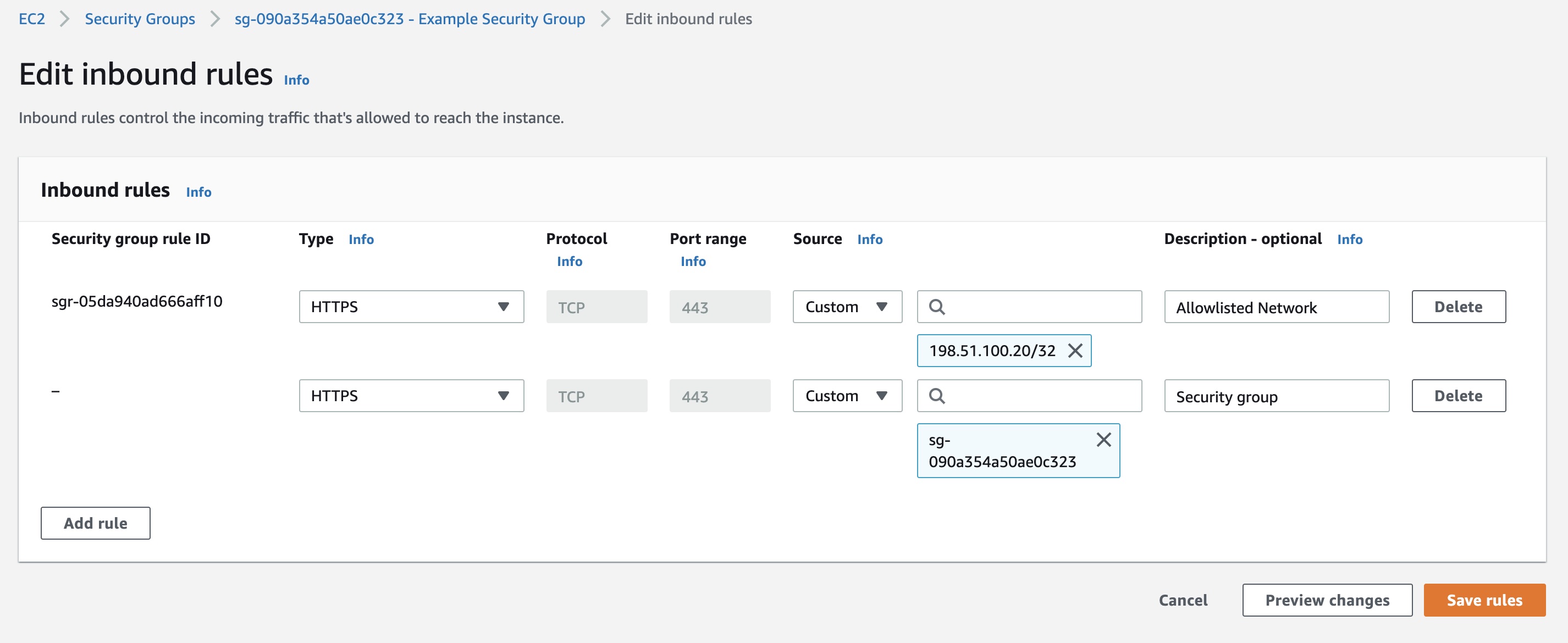
When the security group rule that allows HTTPS into the Web App restricts connections by IP address, that is, the source IP is not 0.0.0.0/0, add a rule that allows the server to connect to itself. Add a rule to the security group that allows HTTPS connections from the same security group.
Linux server workspaces
No audio in Linux xrdp sessions
A session has no sound, and pactl list sinks short shows only a dummy auto_null sink. On Ubuntu 24.04 and later, the pulseaudio-module-xrdp package no longer exists, and xrdp audio support moved to PipeWire through pipewire-module-xrdp. When the session still runs the legacy PulseAudio daemon, the PipeWire xrdp sink never loads and audio falls back to auto_null. Switch the session to PipeWire:
sudo apt-get install -y pipewire pipewire-pulse wireplumber pipewire-audio alsa-utils
sudo apt-get remove -y pulseaudio
sudo systemctl --global enable pipewire.socket pipewire-pulse.socket wireplumber.service
Disconnect and reconnect the session so a fresh user session starts under PipeWire. Verify with pactl info, which reports PulseAudio (on PipeWire ...), and pactl list sinks short, which shows an xrdp sink rather than auto_null. Apply this fix in the golden image, or in a session-start or AutoScale provisioning script, so it persists across newly provisioned sessions.
Web browser missing or Input/output error in a session
Clicking the browser icon does nothing, or it returns an Input/output error. In some images, the browser is not installed by default, so do not rely on it being present in the base image. Install it from the AutoScale provisioning script or a session-start script instead. On Ubuntu 24.04, the snap-packaged Firefox frequently fails under xrdp, so prefer a .deb browser such as Chromium, Chrome, or Firefox from the Mozilla PPA. A stale ~/thinclient_drives FUSE mount left over from a previous xrdp session can also cause an Input/output error. Clear it with fusermount -u ~/thinclient_drives, or disable drive redirection in /etc/xrdp/sesman.ini or xrdp.ini when it is not needed.
Active Directory domain-join failures on auto-scaled VMs
Newly auto-scaled VMs fail to join the domain. SSH into the affected VM that AutoScale created and review the provisioning log at /var/log/kasm_install.log, for example with sudo less /var/log/kasm_install.log. The most common cause is that required ports are not open between the VM and the domain controllers, such as DNS (53), Kerberos (88, 464), LDAP (389, 636), SMB (445), and the Global Catalog (3268). Verify your cloud security lists or network security groups, for example OCI security lists, and any host firewall rules. When AutoScale joins VMs to Active Directory, also review the Linux VM startup script README for the required configuration.