Multi Server Installation
In this example, the Kasm services are installed on different servers within the environment. Depending on the desired use case, these servers can be put in separate network enclaves according to your environment and typical security best practices.
Please read through the entire process before getting started.
Troubleshooting info can be found on the Troubleshooting Page
Issues can be reported on the Kasm Workspaces Issues Page
Architecture Roles
The following outlines the Role Service in this architecture. The ports and protocols required for communication are listed to allow for firewalls or filtering devices in your environment
Web App Server(s)
This is the landing point for end users. If end-users access this server from the internet this may be put in a DMZ enclave. This Server includes the following services:
- Web Application (kasm_api)
- Manager Service (kasm_manager)
- Proxy (kasm_proxy)
- OTel Collector (kasm_otel_collector)
- Ports / Protocols
- HTTPS (443)
Database Server
The database server must be accessible by API and Management Services. This Server includes the following services:
- Database Service (kasm_db)
- Ports / Protocols
- POSTGRESQL (5432)
Agent Server(s)
Agents are where end-user sessions are created. Depending on the desired architecture these may be placed in various locations. The agent must be accessible by the Management and Web App Servers. This server includes the following services:
- Ports / Protocols
- HTTPS (443)
ClickHouse (Observability Database) Server
The ClickHouse observability database stores all telemetry (logs, traces, and metrics). In a multi-server deployment it runs on its own dedicated server and must be accessible by the Web App Server, which reads telemetry for the UI reports and log viewer and forwards telemetry to it through the OTel Collector. This is a required role for a multi-server deployment, exactly like the Database Server. ClickHouse is bundled on the node only in a single-server (
all) installation. This server includes the following services:
- ClickHouse Service (kasm_clickhouse)
- Ports / Protocols
- HTTPS (8443) — secure ClickHouse HTTP interface, used by the Kasm API for UI reports and the log viewer
- Secure Native TCP (9440) — secure ClickHouse native interface, used by the OTel Collector to write telemetry
This role does not run an OTel Collector and does not forward telemetry on its own; it is a storage endpoint only.
Both ports are published to the network over TLS so that the app/all node can reach it.
For details, see the Observability configuration reference page.
Connection Proxy(s)
Connection proxies are used to broker web native RDP/VNC/SSH and RDP thick client sessions to fixed or autoscaled servers. If this functionality is not needed, this role does not need to be installed. Connection proxies need to be accessible from the WebApp servers and to the destination RDP/VNC/SSH servers. If RDP thick client access is desired then the Connection Proxy role must be internet accessible. This server includes the following services:
- Guac Service (kasm_guac)
- RDP Gateway Service (kasm_rdp_gateway)
- proxy (kasm_proxy)
- OTel Collector (kasm_otel_collector)
- Ports / Protocols
- HTTPS (443)
- RDP (3389)
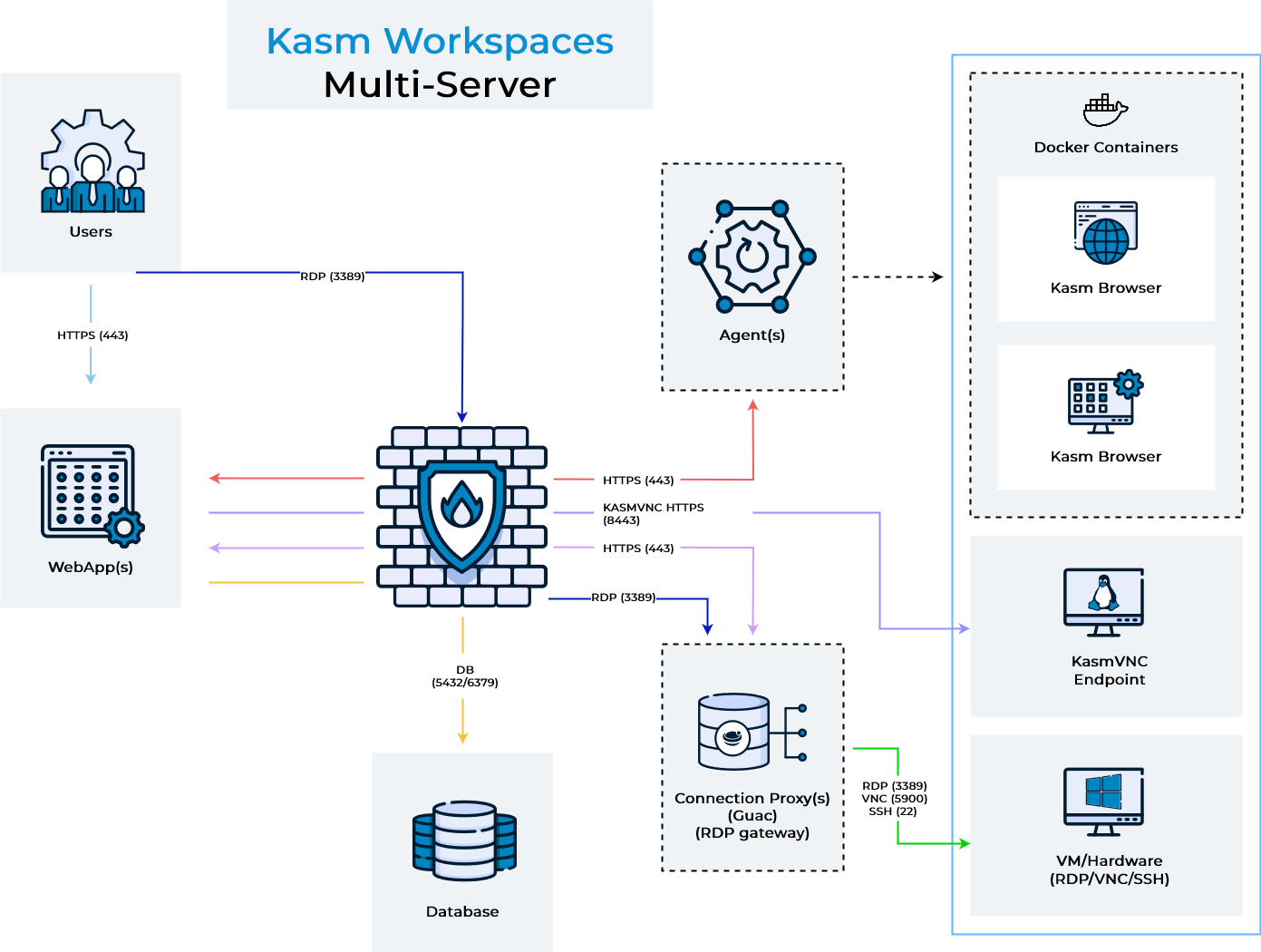
Ports and Protocols
The ports listed below are defaults. The listening port for agents and web app servers can be customized during installation using the -L flag (e.g., install.sh --role agent -L 5173).
If you change default ports, ensure all firewall rules and autoscale configurations are updated accordingly.
| Source | Destination | Port | Notes |
|---|---|---|---|
| End User | Web App Server | 443 | Web Application / UI / API |
| End User | Connection Proxy (rdp-gateway) | 3389 | RDP Connection |
| Web App Server | Database Server | 5432 | Database Access (PostgreSQL) |
| Web App Server | Agent Server | 443 | Agent Instructions |
| Web App Server | Connection Proxy (Guac) | 443 | Proxied RDP Connections to VMs/Hardware |
| Web App Server | VM/Hardware (KasmVNC) | 8443 | Proxied KasmVNC Connections to VMs/Hardware |
| Agent Server | Management Server | 443 | Check-in, Request Images, Request Authentication |
| Connection Proxy (Guac) | VM/Hardware RDP Systems | 3389 | Converts RDP to Web native rendering via Guac |
| Connection Proxy (Guac) | VM/Hardware VNC Systems | 5900 | Converts VNC to Web native rendering via Guac |
| Connection Proxy (Guac) | VM/Hardware SSH Systems | 22 | Converts SSH to Web native rendering via Guac |
| Connection Proxy (Guac) | Web App Server | 443 | RDP Connection Authorization and Status Checks |
| Connection Proxy (rdp-gateway) | VM/Hardware RDP Systems | 3389 | RDP Connection |
Remote nodes (agent, db, guac, proxy) | App/All node | 4317 | Telemetry signals including logs, traces, and metrics using OTLP/gRPC protocol |
| App node | ClickHouse node | 8443 | App queries for logs and telemetry, to populate UI reports |
| App node | ClickHouse node | 9440 | Telemetry signals forwarded by the App node's collector |
System Requirements
Please review the System Requirements before beginning.
Kasm provides a Sizing and Deployment Guide to aid in determining hardware specifications for large scale deployments.
Installation Guide
Follow these steps to setup Kasm on separate servers.
Install Database Server Role
The Database can be configured as a standalone database such as an Amazon RDS instance or an existing Postgres instance, instead of the container provided by Kasm Technologies. For more information, see Standalone Remote Database.
The following steps will install the database service on the Database Server.
- Download the latest version of Kasm Workspaces to /tmp
- Extract the package and execute the installation. Please note the default login credentials produced during the install.
Install Files
| Contents | URL | SHA256 |
|---|---|---|
| Installer Bundle | https://kasm-static-content.s3.amazonaws.com/kasm_release_1.19.0.tar.gz | 7b801cb0579a7867df46b6da873fe8dd631db07d4c05349e5bd1aea27130c37d |
| Contents | URL | SHA256 |
|---|---|---|
| Services | https://kasm-static-content.s3.amazonaws.com/kasm_release_service_images_amd64_1.19.0.tar.gz | c8697a7d6db6d6c2cd685cf431977e79bb4adfa35d91d6fab455e70f4441e46d |
| Workspaces | https://kasm-static-content.s3.amazonaws.com/kasm_release_workspace_images_amd64_1.19.0.tar.gz | 2338ed95653cf37b41c32c4202c38b507fd94a745dc81a303402e20f292486da |
| Network Plugin | https://kasm-static-content.s3.amazonaws.com/kasm_release_network_plugin_images_amd64_1.5.tar.gz | bd13ce71737cebf2e7559c01c2dbff657a52505c771fce450a32bed36ef3056d |
| Logging Plugin | https://kasm-static-content.s3.amazonaws.com/kasm_release_logging_plugin_images_amd64_1.1.tar.gz | fe5d1d6d1acd42ea89e15e375d0d6719f9d6cbf1f9c6943c4fda901a3d529135 |
| Contents | URL | SHA256 |
|---|---|---|
| Services | https://kasm-static-content.s3.amazonaws.com/kasm_release_service_images_arm64_1.19.0.tar.gz | f7975cecf89fc5b1e3886c09178047e7d6f092344ab15f9babfdeaeeb8d01801 |
| Workspaces | https://kasm-static-content.s3.amazonaws.com/kasm_release_workspace_images_arm64_1.19.0.tar.gz | 5ee92ebac22c7399694c9a7eef4d0baddc98c315c2d78848fa3a757d66bcd2c4 |
| Network Plugin | https://kasm-static-content.s3.amazonaws.com/kasm_release_network_plugin_images_arm64_1.5.tar.gz | 59d23f6765f26be86a00fed31b38873d36f9b7b7ecf608a2efb270d969621ae6 |
| Logging Plugin | https://kasm-static-content.s3.amazonaws.com/kasm_release_logging_plugin_images_arm64_1.1.tar.gz | 1d720994c141fe9743b566ea2affeee77759e272ad777d0257ed6a089dd3b802 |
If you have an activation key it can be passed to the installation script and activation will be completed on your behalf as part of the install.
Create a file for the activation key e.g. activation_key.txt and paste in the activation key you received in your confirmation email.
When running the install.sh use the parameter -a or --activation-key-file so your command might look something like this sudo bash kasm_release/install.sh -a activation_key.txt.
This will not work with an offline air-gapped install, as Kasm Workspaces must contact an activation server to complete licensing your installation.
In a multi server install this option only applies to the database role.
- Standard Install
- Offline Install x86-64
- Offline Install arm64
- Rolling
- Initial Build
cd /tmp \
&& curl --fail-early \
    -fO https://kasm-static-content.s3.amazonaws.com/kasm_release_1.19.0-latest.tar.gz \
    -fO https://kasm-static-content.s3.amazonaws.com/kasm_release_1.19.0-latest.sha256sum \
&& sha256sum --check --ignore-missing kasm_release_1.19.0-latest.sha256sum \
&& tar -xf kasm_release_1.19.0-latest.tar.gz \
&& sudo bash kasm_release/install.sh --role db --database-user [DATABASE_USERNAME] --database-name [DATABASE_NAME]
cd /tmp \
&& curl --fail-early \
    -fO https://kasm-static-content.s3.amazonaws.com/kasm_release_1.19.0.tar.gz \
    -fO https://kasm-static-content.s3.amazonaws.com/kasm_release_1.19.0.sha256sum \
&& sha256sum --check --ignore-missing kasm_release_1.19.0.sha256sum \
&& tar -xf kasm_release_1.19.0.tar.gz \
&& sudo bash kasm_release/install.sh --use-static-images --role db --database-user [DATABASE_USERNAME] --database-name [DATABASE_NAME]
- Rolling
- Initial Build
cd /tmp \
&& curl --fail-early \
    -fO https://kasm-static-content.s3.amazonaws.com/kasm_release_1.19.0-latest.tar.gz \
    -fO https://kasm-static-content.s3.amazonaws.com/kasm_release_1.19.0-latest.sha256sum \
    -fO https://kasm-static-content.s3.amazonaws.com/kasm_release_service_images_amd64_1.19.0-latest.tar.gz \
    -fO https://kasm-static-content.s3.amazonaws.com/kasm_release_workspace_images_amd64_1.19.0-latest.tar.gz \
&& sha256sum --check --ignore-missing kasm_release_1.19.0-latest.sha256sum \
&& tar -xf kasm_release_1.19.0-latest.tar.gz \
&& sudo bash kasm_release/install.sh --role db --database-user [DATABASE_USERNAME] --database-name [DATABASE_NAME] --offline-workspaces /tmp/kasm_release_workspace_images_amd64_1.19.0-latest.tar.gz --offline-service /tmp/kasm_release_service_images_amd64_1.19.0-latest.tar.gz
cd /tmp \
&& curl --fail-early \
    -fO https://kasm-static-content.s3.amazonaws.com/kasm_release_1.19.0.tar.gz \
    -fO https://kasm-static-content.s3.amazonaws.com/kasm_release_1.19.0.sha256sum \
    -fO https://kasm-static-content.s3.amazonaws.com/kasm_release_service_images_amd64_1.19.0.tar.gz \
    -fO https://kasm-static-content.s3.amazonaws.com/kasm_release_workspace_images_amd64_1.19.0.tar.gz \
&& sha256sum --check --ignore-missing kasm_release_1.19.0.sha256sum \
&& tar -xf kasm_release_1.19.0.tar.gz \
&& sudo bash kasm_release/install.sh --use-static-images --role db --database-user [DATABASE_USERNAME] --database-name [DATABASE_NAME] --offline-workspaces /tmp/kasm_release_workspace_images_amd64_1.19.0.tar.gz --offline-service /tmp/kasm_release_service_images_amd64_1.19.0.tar.gz
- Rolling
- Initial Build
cd /tmp \
&& curl --fail-early \
    -fO https://kasm-static-content.s3.amazonaws.com/kasm_release_1.19.0-latest.tar.gz \
    -fO https://kasm-static-content.s3.amazonaws.com/kasm_release_1.19.0-latest.sha256sum \
    -fO https://kasm-static-content.s3.amazonaws.com/kasm_release_service_images_arm64_1.19.0-latest.tar.gz \
    -fO https://kasm-static-content.s3.amazonaws.com/kasm_release_workspace_images_arm64_1.19.0-latest.tar.gz \
&& sha256sum --check --ignore-missing kasm_release_1.19.0-latest.sha256sum \
&& tar -xf kasm_release_1.19.0-latest.tar.gz \
&& sudo bash kasm_release/install.sh --role db --database-user [DATABASE_USERNAME] --database-name [DATABASE_NAME] --offline-workspaces /tmp/kasm_release_workspace_images_arm64_1.19.0-latest.tar.gz --offline-service /tmp/kasm_release_service_images_arm64_1.19.0-latest.tar.gz
cd /tmp \
&& curl --fail-early \
    -fO https://kasm-static-content.s3.amazonaws.com/kasm_release_1.19.0.tar.gz \
    -fO https://kasm-static-content.s3.amazonaws.com/kasm_release_1.19.0.sha256sum \
    -fO https://kasm-static-content.s3.amazonaws.com/kasm_release_service_images_arm64_1.19.0.tar.gz \
    -fO https://kasm-static-content.s3.amazonaws.com/kasm_release_workspace_images_arm64_1.19.0.tar.gz \
&& sha256sum --check --ignore-missing kasm_release_1.19.0.sha256sum \
&& tar -xf kasm_release_1.19.0.tar.gz \
&& sudo bash kasm_release/install.sh --use-static-images --role db --database-user [DATABASE_USERNAME] --database-name [DATABASE_NAME] --offline-workspaces /tmp/kasm_release_workspace_images_arm64_1.19.0.tar.gz --offline-service /tmp/kasm_release_service_images_arm64_1.19.0.tar.gz
Starting in 1.19.0, the default installation uses rolling images to deliver ongoing security fixes and updates. For static images with manual update control, pass the -f or --use-static-images argument during the installation or upgrade process.
sudo bash kasm_release/install.sh -f

or

sudo bash kasm_release/upgrade.sh -f
Refer to Rolling Image Management for more information about rolling images.
The DATABASE_USERNAME and DATABASE_NAME are optional and only required if not using the default kasm/kasmapp settings on an Installation 1.13.0 or newer.
Install ClickHouse Role
The ClickHouse telemetry database can be configured as a standalone database such as using a public SaaS offering or an existing, managed instance instead of the container provided by Kasm Technologies.
The following steps will install the ClickHouse observability database (kasm_clickhouse) on the ClickHouse Server. Once installed, ClickHouse listens for TLS connections only, published to the network on ports 8443 (HTTPS) and 9440 (secure native TCP).
- Download the latest version of Kasm Workspaces to /tmp
- Extract the package and execute the installation. Please note the default ClickHouse password produced during the install.
Install Files
| Contents | URL | SHA256 |
|---|---|---|
| Installer Bundle | https://kasm-static-content.s3.amazonaws.com/kasm_release_1.19.0.tar.gz | 7b801cb0579a7867df46b6da873fe8dd631db07d4c05349e5bd1aea27130c37d |
| Contents | URL | SHA256 |
|---|---|---|
| Services | https://kasm-static-content.s3.amazonaws.com/kasm_release_service_images_amd64_1.19.0.tar.gz | c8697a7d6db6d6c2cd685cf431977e79bb4adfa35d91d6fab455e70f4441e46d |
| Workspaces | https://kasm-static-content.s3.amazonaws.com/kasm_release_workspace_images_amd64_1.19.0.tar.gz | 2338ed95653cf37b41c32c4202c38b507fd94a745dc81a303402e20f292486da |
| Network Plugin | https://kasm-static-content.s3.amazonaws.com/kasm_release_network_plugin_images_amd64_1.5.tar.gz | bd13ce71737cebf2e7559c01c2dbff657a52505c771fce450a32bed36ef3056d |
| Logging Plugin | https://kasm-static-content.s3.amazonaws.com/kasm_release_logging_plugin_images_amd64_1.1.tar.gz | fe5d1d6d1acd42ea89e15e375d0d6719f9d6cbf1f9c6943c4fda901a3d529135 |
| Contents | URL | SHA256 |
|---|---|---|
| Services | https://kasm-static-content.s3.amazonaws.com/kasm_release_service_images_arm64_1.19.0.tar.gz | f7975cecf89fc5b1e3886c09178047e7d6f092344ab15f9babfdeaeeb8d01801 |
| Workspaces | https://kasm-static-content.s3.amazonaws.com/kasm_release_workspace_images_arm64_1.19.0.tar.gz | 5ee92ebac22c7399694c9a7eef4d0baddc98c315c2d78848fa3a757d66bcd2c4 |
| Network Plugin | https://kasm-static-content.s3.amazonaws.com/kasm_release_network_plugin_images_arm64_1.5.tar.gz | 59d23f6765f26be86a00fed31b38873d36f9b7b7ecf608a2efb270d969621ae6 |
| Logging Plugin | https://kasm-static-content.s3.amazonaws.com/kasm_release_logging_plugin_images_arm64_1.1.tar.gz | 1d720994c141fe9743b566ea2affeee77759e272ad777d0257ed6a089dd3b802 |
If you have an activation key it can be passed to the installation script and activation will be completed on your behalf as part of the install.
Create a file for the activation key e.g. activation_key.txt and paste in the activation key you received in your confirmation email.
When running the install.sh use the parameter -a or --activation-key-file so your command might look something like this sudo bash kasm_release/install.sh -a activation_key.txt.
This will not work with an offline air-gapped install, as Kasm Workspaces must contact an activation server to complete licensing your installation.
In a multi server install this option only applies to the database role.
The clickhouse role creates two ClickHouse users: a writer user (kasm_otel) that the OTel Collector uses to write telemetry, and a read-only user (kasm_otel_ro) that the Kasm API uses for UI reports and the log viewer. The install prints both credential pairs, along with the exact --clickhouse-* flags to pass on the app/all node.
For the next steps you need the following information
- CLICKHOUSE_PASSWORD Optional
: The password to set for the
kasm_otelwriter ClickHouse user. If omitted, a password is auto-generated and printed at the end of the install. This same password is later passed as--clickhouse-passwordon theapp/allnode to connect. - CLICKHOUSE_READER_PASSWORD Optional
: The password to set for the
kasm_otel_roread-only ClickHouse user. If omitted, a password is auto-generated and printed at the end of the install. This same password is later passed as--clickhouse-reader-passwordon theapp/allnode to connect.
Before continuing, verify the app/all node can access this server on ports [CLICKHOUSE_HOSTNAME]:8443 and [CLICKHOUSE_HOSTNAME]:9440
- Standard Install
- Offline Install x86-64
- Offline Install arm64
- Rolling
- Initial Build
cd /tmp \
&& curl --fail-early \
    -fO https://kasm-static-content.s3.amazonaws.com/kasm_release_1.19.0-latest.tar.gz \
    -fO https://kasm-static-content.s3.amazonaws.com/kasm_release_1.19.0-latest.tar.gz.sha256sum \
&& sha256sum --check *.sha256sum \
&& tar -xf kasm_release_1.19.0-latest.tar.gz \
&& sudo bash kasm_release/install.sh --role clickhouse --clickhouse-password [CLICKHOUSE_PASSWORD] --clickhouse-reader-password [CLICKHOUSE_READER_PASSWORD]
cd /tmp \
&& curl --fail-early \
    -fO https://kasm-static-content.s3.amazonaws.com/kasm_release_1.19.0.tar.gz \
    -fO https://kasm-static-content.s3.amazonaws.com/kasm_release_1.19.0.tar.gz.sha256sum \
&& sha256sum --check *.sha256sum \
&& tar -xf kasm_release_1.19.0.tar.gz \
&& sudo bash kasm_release/install.sh --use-static-images --role clickhouse --clickhouse-password [CLICKHOUSE_PASSWORD] --clickhouse-reader-password [CLICKHOUSE_READER_PASSWORD]
- Rolling
- Initial Build
cd /tmp \
&& curl --fail-early \
    -fO https://kasm-static-content.s3.amazonaws.com/kasm_release_1.19.0-latest.tar.gz \
    -fO https://kasm-static-content.s3.amazonaws.com/kasm_release_1.19.0-latest.tar.gz.sha256sum \
    -fO https://kasm-static-content.s3.amazonaws.com/kasm_release_service_images_amd64_1.19.0-latest.tar.gz \
    -fO https://kasm-static-content.s3.amazonaws.com/kasm_release_service_images_amd64_1.19.0-latest.tar.gz.sha256sum \
&& sha256sum --check *.sha256sum \
&& tar -xf kasm_release_1.19.0-latest.tar.gz \
&& sudo bash kasm_release/install.sh --role clickhouse --clickhouse-password [CLICKHOUSE_PASSWORD] --clickhouse-reader-password [CLICKHOUSE_READER_PASSWORD] --offline-service /tmp/kasm_release_service_images_amd64_1.19.0-latest.tar.gz
cd /tmp \
&& curl --fail-early \
    -fO https://kasm-static-content.s3.amazonaws.com/kasm_release_1.19.0.tar.gz \
    -fO https://kasm-static-content.s3.amazonaws.com/kasm_release_1.19.0.tar.gz.sha256sum \
    -fO https://kasm-static-content.s3.amazonaws.com/kasm_release_service_images_amd64_1.19.0.tar.gz \
    -fO https://kasm-static-content.s3.amazonaws.com/kasm_release_service_images_amd64_1.19.0.tar.gz.sha256sum \
&& sha256sum --check *.sha256sum \
&& tar -xf kasm_release_1.19.0.tar.gz \
&& sudo bash kasm_release/install.sh --use-static-images --role clickhouse --clickhouse-password [CLICKHOUSE_PASSWORD] --clickhouse-reader-password [CLICKHOUSE_READER_PASSWORD] --offline-service /tmp/kasm_release_service_images_amd64_1.19.0.tar.gz
- Rolling
- Initial Build
cd /tmp \
&& curl --fail-early \
    -fO https://kasm-static-content.s3.amazonaws.com/kasm_release_1.19.0-latest.tar.gz \
    -fO https://kasm-static-content.s3.amazonaws.com/kasm_release_1.19.0-latest.tar.gz.sha256sum \
    -fO https://kasm-static-content.s3.amazonaws.com/kasm_release_service_images_arm64_1.19.0-latest.tar.gz \
    -fO https://kasm-static-content.s3.amazonaws.com/kasm_release_service_images_arm64_1.19.0-latest.tar.gz.sha256sum \
&& sha256sum --check *.sha256sum \
&& tar -xf kasm_release_1.19.0-latest.tar.gz \
&& sudo bash kasm_release/install.sh --role clickhouse --clickhouse-password [CLICKHOUSE_PASSWORD] --clickhouse-reader-password [CLICKHOUSE_READER_PASSWORD] --offline-service /tmp/kasm_release_service_images_arm64_1.19.0-latest.tar.gz
cd /tmp \
&& curl --fail-early \
    -fO https://kasm-static-content.s3.amazonaws.com/kasm_release_1.19.0.tar.gz \
    -fO https://kasm-static-content.s3.amazonaws.com/kasm_release_1.19.0.tar.gz.sha256sum \
    -fO https://kasm-static-content.s3.amazonaws.com/kasm_release_service_images_arm64_1.19.0.tar.gz \
    -fO https://kasm-static-content.s3.amazonaws.com/kasm_release_service_images_arm64_1.19.0.tar.gz.sha256sum \
&& sha256sum --check *.sha256sum \
&& tar -xf kasm_release_1.19.0.tar.gz \
&& sudo bash kasm_release/install.sh --use-static-images --role clickhouse --clickhouse-password [CLICKHOUSE_PASSWORD] --clickhouse-reader-password [CLICKHOUSE_READER_PASSWORD] --offline-service /tmp/kasm_release_service_images_arm64_1.19.0.tar.gz
ClickHouse always listens on TLS-only ports 8443 and 9440 on this role, published to the network so remote nodes can reach it. There is no plaintext/Docker-internal-only mode for the dedicated clickhouse role.
Install Web App Role
The following steps will provision the Web App components on a single server. Repeat these steps on additional servers to add redundancy and scalability. Utilize a single public DNS name with multiple public IPs to have DNS load distribute requests to the Web App Kasm Workspaces server cluster.
For the next steps you need the following information
- DATABASE_HOSTNAME : The IP, hostname or FQDN of the Database Server that is resolvable and reachable by the Web App server.
- DATABASE_PASSWORD : The database password generated during the installation of the database.
- DATABASE_USERNAME Optional : The database username if using a custom one. This does not need to be included if using a standard Database Server Role installation.
- DATABASE_NAME Optional : The database name if using a custom one. This does not need to be included if using a standard Database Server Role installation.
- CLICKHOUSE_HOSTNAME : The IP, hostname or FQDN of the ClickHouse Server that is resolvable and reachable by the Web App server.
- CLICKHOUSE_PASSWORD
: The
kasm_otelwriter password generated (or set) during the installation of the ClickHouse Server. - CLICKHOUSE_READER_PASSWORD
: The
kasm_otel_roread-only password generated (or set) during the installation of the ClickHouse Server.
Before continuing, verify this server can access port [DATABASE_HOSTNAME]:5432
The --clickhouse-* flags in the command below point the Web App node at the ClickHouse Server over TLS, and are required in a multi-server deployment. The connection uses two credential pairs: the writer (--clickhouse-username/--clickhouse-password) that the OTel Collector uses to write telemetry over the secure native interface (9440), and the reader (--clickhouse-reader-username/--clickhouse-reader-password) that the Kasm API uses to read telemetry over the HTTPS interface (8443) for UI reports and the log viewer. Omitting the reader credential causes UI reports and the log viewer to fail authentication. Verify this server can access [CLICKHOUSE_HOSTNAME]:8443 and [CLICKHOUSE_HOSTNAME]:9440 before continuing. Retention/TTL of telemetry data is managed on the node that hosts ClickHouse, so retention flags passed to this node have no effect. The --clickhouse-endpoint value includes skip_verify=true because no certificate authority is distributed between nodes; the connection remains encrypted, but the collector does not verify the ClickHouse Server's certificate identity. This matches the Database Server's default TLS posture (sslmode=require): encrypted, without certificate verification. Add skip_verify=false instead if you distribute your own trusted CA to both nodes.
Use the -z flag to set the Deployment Zone that the components will use. The zone will be created if it does not already exist in the deployment. Unless specified, components will use the "default" zone.
Ex: -z east
Installation is the only time that a new Deployment Zone can be created.
- Download the latest version of Kasm Workspaces to /tmp
- Extract the package and run execute the installation
- Standard Install
- Offline Install x86-64
- Offline Install arm64
- Rolling
- Initial Build
cd /tmp \
&& curl --fail-early \
    -fO https://kasm-static-content.s3.amazonaws.com/kasm_release_1.19.0-latest.tar.gz \
    -fO https://kasm-static-content.s3.amazonaws.com/kasm_release_1.19.0-latest.sha256sum \
&& sha256sum --check --ignore-missing kasm_release_1.19.0-latest.sha256sum \
&& tar -xf kasm_release_1.19.0-latest.tar.gz \
&& sudo bash kasm_release/install.sh --role app --db-hostname [DATABASE_HOSTNAME] --db-password [DATABASE_PASSWORD] --database-user [DATABASE_USERNAME]  --database-name [DATABASE_NAME] --clickhouse-endpoint "tcp://[CLICKHOUSE_HOSTNAME]:9440?secure=true&skip_verify=true" --clickhouse-http-endpoint "https://[CLICKHOUSE_HOSTNAME]:8443" --clickhouse-username kasm_otel --clickhouse-password [CLICKHOUSE_PASSWORD] --clickhouse-reader-username kasm_otel_ro --clickhouse-reader-password [CLICKHOUSE_READER_PASSWORD]
cd /tmp \
&& curl --fail-early \
    -fO https://kasm-static-content.s3.amazonaws.com/kasm_release_1.19.0.tar.gz \
    -fO https://kasm-static-content.s3.amazonaws.com/kasm_release_1.19.0.sha256sum \
&& sha256sum --check --ignore-missing kasm_release_1.19.0.sha256sum \
&& tar -xf kasm_release_1.19.0.tar.gz \
&& sudo bash kasm_release/install.sh --use-static-images --role app --db-hostname [DATABASE_HOSTNAME] --db-password [DATABASE_PASSWORD] --database-user [DATABASE_USERNAME]  --database-name [DATABASE_NAME] --clickhouse-endpoint "tcp://[CLICKHOUSE_HOSTNAME]:9440?secure=true&skip_verify=true" --clickhouse-http-endpoint "https://[CLICKHOUSE_HOSTNAME]:8443" --clickhouse-username kasm_otel --clickhouse-password [CLICKHOUSE_PASSWORD] --clickhouse-reader-username kasm_otel_ro --clickhouse-reader-password [CLICKHOUSE_READER_PASSWORD]
- Rolling
- Initial Build
cd /tmp \
&& curl --fail-early \
    -fO https://kasm-static-content.s3.amazonaws.com/kasm_release_1.19.0-latest.tar.gz \
    -fO https://kasm-static-content.s3.amazonaws.com/kasm_release_1.19.0-latest.sha256sum \
    -fO https://kasm-static-content.s3.amazonaws.com/kasm_release_service_images_amd64_1.19.0-latest.tar.gz \
&& sha256sum --check --ignore-missing kasm_release_1.19.0-latest.sha256sum \
&& tar -xf kasm_release_1.19.0-latest.tar.gz \
&& sudo bash kasm_release/install.sh --role app --offline-service /tmp/kasm_release_service_images_amd64_1.19.0-latest.tar.gz --db-hostname [DATABASE_HOSTNAME] --db-password [DATABASE_PASSWORD] --database-user [DATABASE_USERNAME]  --database-name [DATABASE_NAME] --clickhouse-endpoint "tcp://[CLICKHOUSE_HOSTNAME]:9440?secure=true&skip_verify=true" --clickhouse-http-endpoint "https://[CLICKHOUSE_HOSTNAME]:8443" --clickhouse-username kasm_otel --clickhouse-password [CLICKHOUSE_PASSWORD] --clickhouse-reader-username kasm_otel_ro --clickhouse-reader-password [CLICKHOUSE_READER_PASSWORD]
cd /tmp \
&& curl --fail-early \
    -fO https://kasm-static-content.s3.amazonaws.com/kasm_release_1.19.0.tar.gz \
    -fO https://kasm-static-content.s3.amazonaws.com/kasm_release_1.19.0.sha256sum \
    -fO https://kasm-static-content.s3.amazonaws.com/kasm_release_service_images_amd64_1.19.0.tar.gz \
&& sha256sum --check --ignore-missing kasm_release_1.19.0.sha256sum \
&& tar -xf kasm_release_1.19.0.tar.gz \
&& sudo bash kasm_release/install.sh --use-static-images --role app --offline-service /tmp/kasm_release_service_images_amd64_1.19.0.tar.gz --db-hostname [DATABASE_HOSTNAME] --db-password [DATABASE_PASSWORD] --database-user [DATABASE_USERNAME]  --database-name [DATABASE_NAME] --clickhouse-endpoint "tcp://[CLICKHOUSE_HOSTNAME]:9440?secure=true&skip_verify=true" --clickhouse-http-endpoint "https://[CLICKHOUSE_HOSTNAME]:8443" --clickhouse-username kasm_otel --clickhouse-password [CLICKHOUSE_PASSWORD] --clickhouse-reader-username kasm_otel_ro --clickhouse-reader-password [CLICKHOUSE_READER_PASSWORD]
- Rolling
- Initial Build
cd /tmp \
&& curl --fail-early \
    -fO https://kasm-static-content.s3.amazonaws.com/kasm_release_1.19.0-latest.tar.gz \
    -fO https://kasm-static-content.s3.amazonaws.com/kasm_release_1.19.0-latest.sha256sum \
    -fO https://kasm-static-content.s3.amazonaws.com/kasm_release_service_images_arm64_1.19.0-latest.tar.gz \
&& sha256sum --check --ignore-missing kasm_release_1.19.0-latest.sha256sum \
&& tar -xf kasm_release_1.19.0-latest.tar.gz \
&& sudo bash kasm_release/install.sh --role app --offline-service /tmp/kasm_release_service_images_arm64_1.19.0-latest.tar.gz --db-hostname [DATABASE_HOSTNAME] --db-password [DATABASE_PASSWORD] --database-user [DATABASE_USERNAME]  --database-name [DATABASE_NAME] --clickhouse-endpoint "tcp://[CLICKHOUSE_HOSTNAME]:9440?secure=true&skip_verify=true" --clickhouse-http-endpoint "https://[CLICKHOUSE_HOSTNAME]:8443" --clickhouse-username kasm_otel --clickhouse-password [CLICKHOUSE_PASSWORD] --clickhouse-reader-username kasm_otel_ro --clickhouse-reader-password [CLICKHOUSE_READER_PASSWORD]
cd /tmp \
&& curl --fail-early \
    -fO https://kasm-static-content.s3.amazonaws.com/kasm_release_1.19.0.tar.gz \
    -fO https://kasm-static-content.s3.amazonaws.com/kasm_release_1.19.0.sha256sum \
    -fO https://kasm-static-content.s3.amazonaws.com/kasm_release_service_images_arm64_1.19.0.tar.gz \
&& sha256sum --check --ignore-missing kasm_release_1.19.0.sha256sum \
&& tar -xf kasm_release_1.19.0.tar.gz \
&& sudo bash kasm_release/install.sh --use-static-images --role app --offline-service /tmp/kasm_release_service_images_arm64_1.19.0.tar.gz --db-hostname [DATABASE_HOSTNAME] --db-password [DATABASE_PASSWORD] --database-user [DATABASE_USERNAME]  --database-name [DATABASE_NAME] --clickhouse-endpoint "tcp://[CLICKHOUSE_HOSTNAME]:9440?secure=true&skip_verify=true" --clickhouse-http-endpoint "https://[CLICKHOUSE_HOSTNAME]:8443" --clickhouse-username kasm_otel --clickhouse-password [CLICKHOUSE_PASSWORD] --clickhouse-reader-username kasm_otel_ro --clickhouse-reader-password [CLICKHOUSE_READER_PASSWORD]
- Log into the Web Application running on port 443 at https://<WEBAPP_SERVER>
- The Default usernames are admin@kasm.local and user@kasm.local. The passwords will be randomly generated and presented at the end of the install unless the
--admin-passwordor/and--user-passwordare specified.
Install Agent Server Role(s)
The following steps will install the Agent and Proxy services. Repeat these steps for any additional servers intended to provision end user sessions
For the next steps you need the following information
- MANAGER_HOSTNAME : The IP, hostname or FQDN of the Web App Server that is resolvable and reachable by the Agent server.
- MANAGER_TOKEN : The manger token generated during the db install. This is used for authentication by the Agent.
- AGENT_HOSTNAME : This IP, hostname, or FQDN of this Agent Server that is resolvable and reachable by the Web App Server. This value will be reported by the Agent Service during check in routines and used by other services to communicate with it.
- OTEL_TOKEN : The OTel token generated during the App role install, used to authenticate telemetry sent by remote roles.
Before continuing, verify this server can access ports [MANAGER_HOSTNAME]:443 and [MANAGER_HOSTNAME]:4317
- Download the latest version of Kasm Workspaces to /tmp
- Extract the package and execute the installation
- Standard Install
- Offline Install x86-64
- Offline Install arm64
- Rolling
- Initial Build
cd /tmp \
&& curl --fail-early \
    -fO https://kasm-static-content.s3.amazonaws.com/kasm_release_1.19.0-latest.tar.gz \
    -fO https://kasm-static-content.s3.amazonaws.com/kasm_release_1.19.0-latest.sha256sum \
&& sha256sum --check --ignore-missing kasm_release_1.19.0-latest.sha256sum \
&& tar -xf kasm_release_1.19.0-latest.tar.gz \
&& sudo bash kasm_release/install.sh --role agent --public-hostname [AGENT_HOSTNAME] --agent-registration-hostname [MANAGER_HOSTNAME] --agent-token [MANAGER_TOKEN] --otel-token [OTEL_TOKEN] --otel-collector-hostname [MANAGER_HOSTNAME]
cd /tmp \
&& curl --fail-early \
    -fO https://kasm-static-content.s3.amazonaws.com/kasm_release_1.19.0.tar.gz \
    -fO https://kasm-static-content.s3.amazonaws.com/kasm_release_1.19.0.sha256sum \
&& sha256sum --check --ignore-missing kasm_release_1.19.0.sha256sum \
&& tar -xf kasm_release_1.19.0.tar.gz \
&& sudo bash kasm_release/install.sh --use-static-images --role agent --public-hostname [AGENT_HOSTNAME] --agent-registration-hostname [MANAGER_HOSTNAME] --agent-token [MANAGER_TOKEN] --otel-token [OTEL_TOKEN] --otel-collector-hostname [MANAGER_HOSTNAME]
- Rolling
- Initial Build
cd /tmp \
&& curl --fail-early \
    -fO https://kasm-static-content.s3.amazonaws.com/kasm_release_1.19.0-latest.tar.gz \
    -fO https://kasm-static-content.s3.amazonaws.com/kasm_release_1.19.0-latest.sha256sum \
    -fO https://kasm-static-content.s3.amazonaws.com/kasm_release_service_images_amd64_1.19.0-latest.tar.gz \
    -fO https://kasm-static-content.s3.amazonaws.com/kasm_release_workspace_images_amd64_1.19.0-latest.tar.gz \
    -fO https://kasm-static-content.s3.amazonaws.com/kasm_release_network_plugin_images_amd64_1.5-latest.tar.gz \
    -fO https://kasm-static-content.s3.amazonaws.com/kasm_release_logging_plugin_images_amd64_1.1-latest.tar.gz \
&& sha256sum --check --ignore-missing kasm_release_1.19.0-latest.sha256sum \
&& tar -xf kasm_release_1.19.0-latest.tar.gz \
&& sudo bash kasm_release/install.sh --role agent --offline-workspaces /tmp/kasm_release_workspace_images_amd64_1.19.0-latest.tar.gz --offline-service /tmp/kasm_release_service_images_amd64_1.19.0-latest.tar.gz --offline-network-plugin /tmp/kasm_release_network_plugin_images_amd64_1.5-latest.tar.gz --offline-logger-plugin /tmp/kasm_release_logging_plugin_images_amd64_1.1-latest.tar.gz --public-hostname [AGENT_HOSTNAME] --agent-registration-hostname [MANAGER_HOSTNAME] --agent-token [MANAGER_TOKEN] --otel-token [OTEL_TOKEN] --otel-collector-hostname [MANAGER_HOSTNAME]
cd /tmp \
&& curl --fail-early \
    -fO https://kasm-static-content.s3.amazonaws.com/kasm_release_1.19.0.tar.gz \
    -fO https://kasm-static-content.s3.amazonaws.com/kasm_release_1.19.0.sha256sum \
    -fO https://kasm-static-content.s3.amazonaws.com/kasm_release_service_images_amd64_1.19.0.tar.gz \
    -fO https://kasm-static-content.s3.amazonaws.com/kasm_release_workspace_images_amd64_1.19.0.tar.gz \
    -fO https://kasm-static-content.s3.amazonaws.com/kasm_release_network_plugin_images_amd64_1.5.tar.gz \
    -fO https://kasm-static-content.s3.amazonaws.com/kasm_release_logging_plugin_images_amd64_1.1.tar.gz \
&& sha256sum --check --ignore-missing kasm_release_1.19.0.sha256sum \
&& tar -xf kasm_release_1.19.0.tar.gz \
&& sudo bash kasm_release/install.sh --use-static-images --role agent --offline-workspaces /tmp/kasm_release_workspace_images_amd64_1.19.0.tar.gz --offline-service /tmp/kasm_release_service_images_amd64_1.19.0.tar.gz --offline-network-plugin /tmp/kasm_release_network_plugin_images_amd64_1.5.tar.gz --offline-logger-plugin /tmp/kasm_release_logging_plugin_images_amd64_1.1.tar.gz --public-hostname [AGENT_HOSTNAME] --agent-registration-hostname [MANAGER_HOSTNAME] --agent-token [MANAGER_TOKEN] --otel-token [OTEL_TOKEN] --otel-collector-hostname [MANAGER_HOSTNAME]
- Rolling
- Initial Build
cd /tmp \
&& curl --fail-early \
    -fO https://kasm-static-content.s3.amazonaws.com/kasm_release_1.19.0-latest.tar.gz \
    -fO https://kasm-static-content.s3.amazonaws.com/kasm_release_1.19.0-latest.sha256sum \
    -fO https://kasm-static-content.s3.amazonaws.com/kasm_release_service_images_arm64_1.19.0-latest.tar.gz \
    -fO https://kasm-static-content.s3.amazonaws.com/kasm_release_workspace_images_arm64_1.19.0-latest.tar.gz \
    -fO https://kasm-static-content.s3.amazonaws.com/kasm_release_network_plugin_images_arm64_1.5-latest.tar.gz \
    -fO https://kasm-static-content.s3.amazonaws.com/kasm_release_logging_plugin_images_arm64_1.1-latest.tar.gz \
&& sha256sum --check --ignore-missing kasm_release_1.19.0-latest.sha256sum \
&& tar -xf kasm_release_1.19.0-latest.tar.gz \
&& sudo bash kasm_release/install.sh --role agent --offline-workspaces /tmp/kasm_release_workspace_images_arm64_1.19.0-latest.tar.gz --offline-service /tmp/kasm_release_service_images_arm64_1.19.0-latest.tar.gz --offline-network-plugin /tmp/kasm_release_network_plugin_images_arm64_1.5-latest.tar.gz --offline-logger-plugin /tmp/kasm_release_logging_plugin_images_arm64_1.1-latest.tar.gz --public-hostname [AGENT_HOSTNAME] --agent-registration-hostname [MANAGER_HOSTNAME] --agent-token [MANAGER_TOKEN] --otel-token [OTEL_TOKEN] --otel-collector-hostname [MANAGER_HOSTNAME]
cd /tmp \
&& curl --fail-early \
    -fO https://kasm-static-content.s3.amazonaws.com/kasm_release_1.19.0.tar.gz \
    -fO https://kasm-static-content.s3.amazonaws.com/kasm_release_1.19.0.sha256sum \
    -fO https://kasm-static-content.s3.amazonaws.com/kasm_release_service_images_arm64_1.19.0.tar.gz \
    -fO https://kasm-static-content.s3.amazonaws.com/kasm_release_workspace_images_arm64_1.19.0.tar.gz \
    -fO https://kasm-static-content.s3.amazonaws.com/kasm_release_network_plugin_images_arm64_1.5.tar.gz \
    -fO https://kasm-static-content.s3.amazonaws.com/kasm_release_logging_plugin_images_arm64_1.1.tar.gz \
&& sha256sum --check --ignore-missing kasm_release_1.19.0.sha256sum \
&& tar -xf kasm_release_1.19.0.tar.gz \
&& sudo bash kasm_release/install.sh --use-static-images --role agent --offline-workspaces /tmp/kasm_release_workspace_images_arm64_1.19.0.tar.gz --offline-service /tmp/kasm_release_service_images_arm64_1.19.0.tar.gz --offline-network-plugin /tmp/kasm_release_network_plugin_images_arm64_1.5.tar.gz --offline-logger-plugin /tmp/kasm_release_logging_plugin_images_arm64_1.1.tar.gz --public-hostname [AGENT_HOSTNAME] --agent-registration-hostname [MANAGER_HOSTNAME] --agent-token [MANAGER_TOKEN] --otel-token [OTEL_TOKEN] --otel-collector-hostname [MANAGER_HOSTNAME]
-
Log into the UI as an Administrator, select Infrastructure > Docker Agents and using the arrow menu select edit on the agent you just created. Make sure Enabled is selected and click Save.
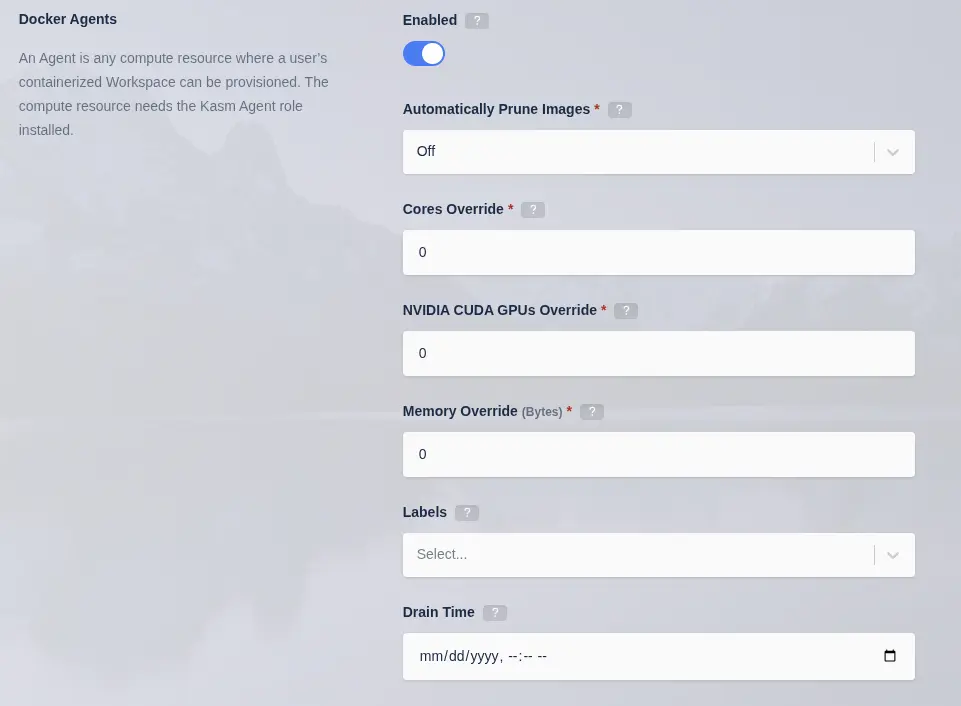
Update Agent
(Optional) Install Connection Proxy (Guac/rdp-gateway) Role(s)
The Connection proxy role is required to support connecting to VMs/Hardware via RDP, VNC, or SSH. Workspace supports connecting to pre-exiting machines or auto provisioning them via Cloud Autoscaling. If these services are not needed, this role does not need to be installed.
For the next steps you need the following information
- MANAGER_HOSTNAME : The IP, hostname or FQDN of the Web App Server that is resolvable and reachable by the Agent server.
- SERVICE_REGISTRATION_TOKEN : The registration token generated during the db install. This is used to register the Connection Proxy with the system. The Service Registration Token (AKA Component Registration Token) can also be found in the global settings in the Kasm Admin UI.
- CONNECTION_PROXY_HOSTNAME : This IP, hostname, or FQDN of this Connection Proxy Server that is resolvable and reachable by the Web App Server. This value will be reported by the Connection Proxy Server during registration and used by other services to communicate with it.
- OTEL_TOKEN : The OTel token generated during the App role install, used to authenticate telemetry sent by remote roles.
Before continuing, verify this server can access ports [MANAGER_HOSTNAME]:443 and [MANAGER_HOSTNAME]:4317
Use the -z flag to set the Deployment Zone that the components will use. Unless specified, components will use the "default" zone.
Ex: -z east
- Download the latest version of Kasm Workspaces to /tmp
- Extract the package and execute the installation
- Standard Install
- Offline Install x86-64
- Offline Install arm64
- Rolling
- Initial Build
cd /tmp \
&& curl --fail-early \
    -fO https://kasm-static-content.s3.amazonaws.com/kasm_release_1.19.0-latest.tar.gz \
    -fO https://kasm-static-content.s3.amazonaws.com/kasm_release_1.19.0-latest.sha256sum \
&& sha256sum --check --ignore-missing kasm_release_1.19.0-latest.sha256sum \
&& tar -xf kasm_release_1.19.0-latest.tar.gz \
&& sudo bash kasm_release/install.sh --role guac --api-hostname [MANAGER_HOSTNAME] --public-hostname [CONNECTION_PROXY_HOSTNAME] --registration-token [SERVICE_REGISTRATION_TOKEN] --otel-token [OTEL_TOKEN] --otel-collector-hostname [MANAGER_HOSTNAME]
cd /tmp \
&& curl --fail-early \
    -fO https://kasm-static-content.s3.amazonaws.com/kasm_release_1.19.0.tar.gz \
    -fO https://kasm-static-content.s3.amazonaws.com/kasm_release_1.19.0.sha256sum \
&& sha256sum --check --ignore-missing kasm_release_1.19.0.sha256sum \
&& tar -xf kasm_release_1.19.0.tar.gz \
&& sudo bash kasm_release/install.sh --use-static-images --role guac --api-hostname [MANAGER_HOSTNAME] --public-hostname [CONNECTION_PROXY_HOSTNAME] --registration-token [SERVICE_REGISTRATION_TOKEN] --otel-token [OTEL_TOKEN] --otel-collector-hostname [MANAGER_HOSTNAME]
- Rolling
- Initial Build
cd /tmp \
&& curl --fail-early \
    -fO https://kasm-static-content.s3.amazonaws.com/kasm_release_1.19.0-latest.tar.gz \
    -fO https://kasm-static-content.s3.amazonaws.com/kasm_release_1.19.0-latest.sha256sum \
    -fO https://kasm-static-content.s3.amazonaws.com/kasm_release_service_images_amd64_1.19.0-latest.tar.gz \
&& sha256sum --check --ignore-missing kasm_release_1.19.0-latest.sha256sum \
&& tar -xf kasm_release_1.19.0-latest.tar.gz \
&& sudo bash kasm_release/install.sh --role guac --offline-service /tmp/kasm_release_service_images_amd64_1.19.0-latest.tar.gz --api-hostname [MANAGER_HOSTNAME] --public-hostname [CONNECTION_PROXY_HOSTNAME] --registration-token [SERVICE_REGISTRATION_TOKEN] --otel-token [OTEL_TOKEN] --otel-collector-hostname [MANAGER_HOSTNAME]
cd /tmp \
&& curl --fail-early \
    -fO https://kasm-static-content.s3.amazonaws.com/kasm_release_1.19.0.tar.gz \
    -fO https://kasm-static-content.s3.amazonaws.com/kasm_release_1.19.0.sha256sum \
    -fO https://kasm-static-content.s3.amazonaws.com/kasm_release_service_images_amd64_1.19.0.tar.gz \
&& sha256sum --check --ignore-missing kasm_release_1.19.0.sha256sum \
&& tar -xf kasm_release_1.19.0.tar.gz \
&& sudo bash kasm_release/install.sh --use-static-images --role guac --offline-service /tmp/kasm_release_service_images_amd64_1.19.0.tar.gz --api-hostname [MANAGER_HOSTNAME] --public-hostname [CONNECTION_PROXY_HOSTNAME] --registration-token [SERVICE_REGISTRATION_TOKEN] --otel-token [OTEL_TOKEN] --otel-collector-hostname [MANAGER_HOSTNAME]
- Rolling
- Initial Build
cd /tmp \
&& curl --fail-early \
    -fO https://kasm-static-content.s3.amazonaws.com/kasm_release_1.19.0-latest.tar.gz \
    -fO https://kasm-static-content.s3.amazonaws.com/kasm_release_1.19.0-latest.sha256sum \
    -fO https://kasm-static-content.s3.amazonaws.com/kasm_release_service_images_arm64_1.19.0-latest.tar.gz \
&& sha256sum --check --ignore-missing kasm_release_1.19.0-latest.sha256sum \
&& tar -xf kasm_release_1.19.0-latest.tar.gz \
&& sudo bash kasm_release/install.sh --role guac --offline-service /tmp/kasm_release_service_images_arm64_1.19.0-latest.tar.gz --api-hostname [MANAGER_HOSTNAME] --public-hostname [CONNECTION_PROXY_HOSTNAME] --registration-token [SERVICE_REGISTRATION_TOKEN] --otel-token [OTEL_TOKEN] --otel-collector-hostname [MANAGER_HOSTNAME]
cd /tmp \
&& curl --fail-early \
    -fO https://kasm-static-content.s3.amazonaws.com/kasm_release_1.19.0.tar.gz \
    -fO https://kasm-static-content.s3.amazonaws.com/kasm_release_1.19.0.sha256sum \
    -fO https://kasm-static-content.s3.amazonaws.com/kasm_release_service_images_arm64_1.19.0.tar.gz \
&& sha256sum --check --ignore-missing kasm_release_1.19.0.sha256sum \
&& tar -xf kasm_release_1.19.0.tar.gz \
&& sudo bash kasm_release/install.sh --use-static-images --role guac --offline-service /tmp/kasm_release_service_images_arm64_1.19.0.tar.gz --api-hostname [MANAGER_HOSTNAME] --public-hostname [CONNECTION_PROXY_HOSTNAME] --registration-token [SERVICE_REGISTRATION_TOKEN] --otel-token [OTEL_TOKEN] --otel-collector-hostname [MANAGER_HOSTNAME]
All nodes in a distributed deployment must share the same OTel bearer token (--otel-token). Specify --otel-collector-hostname on remote roles to point them to the app/all node. For the full flag reference and offline image pre-pulls, see the Observability configuration reference page.
By default, the inter-collector hop (port 4317) between each remote node's collector and the central collector on the app/all node is bearer-token authenticated and TLS-encrypted, without certificate verification. If the app/all node was installed with a CA-signed certificate (--ssl-public-cert/--ssl-private-key) whose SANs cover the exact hostname passed as --otel-collector-hostname, add --otel-collector-verify-tls (public CA) or --otel-collector-ca-cert <path> (private/corporate CA) to the remote role's install command to turn on certificate verification for that hop, for example:
sudo bash kasm_release/install.sh --role guac --api-hostname kasm-app.example.com --public-hostname 192.0.2.20 --registration-token [SERVICE_REGISTRATION_TOKEN] --otel-token [OTEL_TOKEN] --otel-collector-hostname kasm-app.example.com --otel-collector-ca-cert /path/to/corporate-ca.pem
See "Configure custom TLS certificates" in the Deploy and manage observability guide for the full prerequisites and procedure.
For offline installs, pre-pull these two new container images before running the installer:
docker pull otel/opentelemetry-collector-contrib:0.160.0
docker pull clickhouse/clickhouse-server:24.12-alpine
Note: kasm_clickhouse is deployed only on a single-server all node, or on a dedicated clickhouse role node. The app role never bundles ClickHouse and must connect to a dedicated or external instance. kasm_otel_collector is not deployed on clickhouse role nodes.
All install options
| Flag | Description |
|---|---|
-h, --help | Display the help menu |
-V, --install-profile | Installation profile to use (kasm_release/profiles) |
-S, --role | Role to install: [all|app|db|agent|init_remote_db|guac|proxy|clickhouse] |
-L, --proxy-port | Default proxy listening port |
-v, --verbose | Verbose output |
-e, --accept-eula | Accept End User License Agreement |
-d, --no-db-init | Skip database initialization |
-D, --no-start | Don't start services at the end of installation |
-W, --default-images | Seed and Download default Workspaces Images |
-z, --server-zone | Server Zone (Deployment Zone for components) |
-q, --db-hostname | Database Hostname |
-Q, --db-password | Default Database Password |
-c, --database-user | Database user |
-j, --database-name | Database name |
-t, --no-db-ssl | Database, Disable SSL |
-T, --db-port | Database port for external DB (default 5432) |
-U, --user-password | Default User Password |
-P, --admin-password | Default Admin Password |
-p, --public-hostname | Agent/Component IP/Hostname used to register with deployment |
-m, --agent-registration-hostname | Hostname or IP of the Web App that the agent registers with |
-M, --agent-token | Agent token, printed by the Web App install |
-i, --agent-server-id | Set Agent server ID |
-n, --api-hostname | Set API server hostname |
-a, --activation-key-file | License Activation key file path |
-w, --offline-workspaces | Path to the tar.gz workspace images offline installer |
-s, --offline-service | Path to the tar.gz service images offline installer |
-x, --offline-network-plugin | Path to the tar.gz network plugin images offline installer |
--offline-logger-plugin | Path to the tar.gz logger plugin images offline installer |
-O, --use-rolling-images | Use rolling Workspaces images |
-f, --use-static-images | Use static version Workspaces images |
-F, --use-tag | Use a specific tag for service images (defaults to the build date) |
-G, --db-master-password | Database master password for database remote init |
-g, --db-master-user | Database master user for database remote init |
-r, --agent-provider | Set agent provider |
-A, --enable-lossless | Enable lossless streaming option |
-k, --registration-token | Register a component with an existing deployment |
-y, --default-registry-url | Set the default Workspaces Registry URL |
-H, --no-swap-check | Disable check for swapfile |
-J, --swap-size | Create swap if none exists in megabytes (e.g., 4096) |
-B, --no-check-ports | Do not check for open ports |
-b, --no-check-disk | Do not check disk space |
-N, --skip-connection-test | Skip database connection tests |
-X, --skip-v4l2loopback | Skip v4l2loopback installation |
--guac-cluster-size | Set guac cluster size, 0 for automatic |
--skip-custom-rclone | Install the stock Rclone plugin without modification |
--skip-egress | Do not install egress network plugin or dependencies |
--enable-epel | Enable EPEL repo to install packages not in default RHEL repos. Required for WireGuard on RHEL/Rocky/AlmaLinux/Oracle 8 — pass this flag explicitly or respond y to the interactive prompt. |
--ignore-dep-failures | Continue installation even if optional dependencies fail to install |
--install-depends | Force dependency installation even during offline installs. Has no effect on online installs (deps always run by default). |
--ssl-public-cert | Copy the public SSL certificate from this path during install |
--ssl-private-key | Copy the private SSL key from this path during install |
--skip-otel | Do not install the OTel Collector or ClickHouse |
--otel-token | Bearer token for inter-collector authentication — must be identical on every node in a distributed deployment (auto-generated if omitted) |
--otel-collector-hostname | Hostname of the central collector node (app/all role) — required on remote roles (agent, guac, proxy) |
--otel-collector-verify-tls | Verify the central collector's certificate on the inter-collector hop (4317) instead of skipping verification. Set on remote roles (agent, guac, proxy); no effect on db/all/app/clickhouse. Requires a CA-signed cert on the app/all node whose SANs cover --otel-collector-hostname |
--otel-collector-ca-cert | CA certificate to trust for that verification; implies --otel-collector-verify-tls. Use for a private/corporate CA |
--otel-collector-endpoint | Use a custom OTLP/HTTP collector (e.g. Grafana Alloy) instead of the bundled one; app/all roles only |
--clickhouse-endpoint | Native-interface DSN of a dedicated or external ClickHouse; requires --clickhouse-http-endpoint. Set on app/all roles — required on app (the role never bundles ClickHouse) unless --no-clickhouse is set; removes the bundled container on all |
--clickhouse-http-endpoint | HTTP(S) URL of the same dedicated or external ClickHouse, read by the Kasm API for UI reports and the log viewer. Set on app/all roles — required on app unless --no-clickhouse is set |
--clickhouse-username | Username for the dedicated or external ClickHouse database (default: kasm_otel) |
--clickhouse-database | ClickHouse database name (default: kasm_otel); independent of --clickhouse-username — set both for a tenant-specific database |
--clickhouse-password | Sets the ClickHouse server password on the clickhouse role, or the bundled ClickHouse's password on all. On app, this is the connect password used to reach the required dedicated or external ClickHouse |
--clickhouse-reader-username | Read-only username for the dedicated or external ClickHouse database, used by the Kasm API for UI reports and the log viewer (default: kasm_otel_ro) |
--clickhouse-reader-password | Sets the read-only ClickHouse server password on the clickhouse role, or the bundled ClickHouse's read-only password on all. On app, this is the connect password used to reach the required dedicated or external ClickHouse |
--no-clickhouse | On all, do not deploy the bundled ClickHouse. On app, run the node without any ClickHouse (debug exporter mode) instead of requiring a dedicated or external one. Mutually exclusive with --clickhouse-endpoint/--clickhouse-http-endpoint |
--otel-forward-endpoint | Additionally forward all telemetry to this OTLP/HTTP endpoint (e.g. a remote Grafana Cloud instance) |
--otel-forward-token | Bearer token for --otel-forward-endpoint |
--otel-trace-sample-percentage | Percentage (0–100) of non-error, non-slow traces to retain (default: 10) |
--otel-logs-retention-days | General log retention in days (default: 30) |
--otel-audit-logs-retention-days | Audit log retention in days (default: 365) |
--otel-traces-retention-days | Trace retention in days (default: 7) |
--otel-metrics-retention-days | Metrics retention in days (default: 90) |
Dedicated Kasm Proxy (optional)
In a standard Multi Server installation the Proxy service that handles pointing the client to the correct agent server
is included with the Web App role along with all other client UI and routing. The need might arise to have many proxies spread out over different geographic locations while keeping a single web endpoint serving static web content with the Proxy serving the Kasm Workspaces session. To facilitate this there is a proxy installation role that installs and configures a web proxy to direct end users to the correct agent to spin up a Kasm Workspaces session.
Proxy Overview
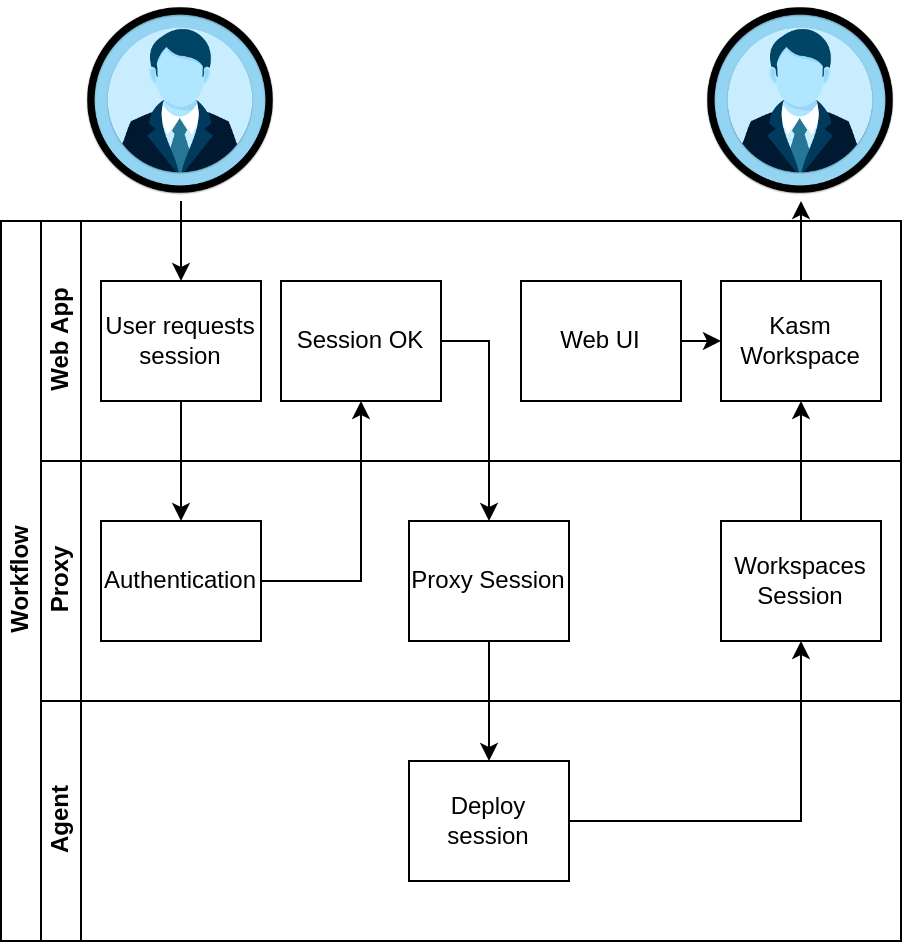
The user follows the same workflow when launching a workspace and on the backend we direct them to the correct Agent/s, but unlike a standard Multi Server Deployment the Workspaces Session is routed through the Proxy in the user's geographic region to reduce latency.
Proxy installation
This guide assumes you have a running Multi Server deployment of Kasm Workspaces and have a basic understanding of domain/SSL management. For help with SSL certificates please see Custom Certificates
The following steps can be followed to install the proxy role to a server:
- Ensure the Proxy server has a domain name pointed to it and a legitimate SSL certificate.
- Download the latest version of Kasm Workspaces to /tmp.
- Extract the package and execute the installation.
- Post install, configure Kasm Workspaces via the Web UI to use the new Proxy.
In this example we assume the proxy domain is proxy.example.com and the Web App hosting the API server is located at workspaces.example.com.
Proxy Server installation
It is important that the agents in your Multi Server installation can be accessed by this Proxy server deployment ensure connectivity to the Agent server from the Proxy server before installation.
In order to install the proxy role you will need the following information:
- Web App server URL — the hostname of the server running the
approle (for example,workspaces.example.com). This endpoint is used for authentication and is required to enforce strict CORS policies. - OTel bearer token — the shared
--otel-tokenvalue configured on theappnode. Pass the same token here so this proxy node reports telemetry to the same collector.
- Rolling
- Initial Build
cd /tmp \
&& curl --fail-early \
    -fO https://kasm-static-content.s3.amazonaws.com/kasm_release_1.19.0-latest.tar.gz \
    -fO https://kasm-static-content.s3.amazonaws.com/kasm_release_1.19.0-latest.sha256sum \
&& sha256sum --check --ignore-missing kasm_release_1.19.0-latest.sha256sum \
&& tar -xf kasm_release*-latest.tar.gz \
&& sudo bash kasm_release/install.sh --role proxy --api-hostname workspaces.kasmweb.com --otel-token [OTEL_TOKEN] --otel-collector-hostname workspaces.kasmweb.com
cd /tmp \
&& curl --fail-early \
    -fO https://kasm-static-content.s3.amazonaws.com/kasm_release_1.19.0.tar.gz \
    -fO https://kasm-static-content.s3.amazonaws.com/kasm_release_1.19.0.sha256sum \
&& sha256sum --check --ignore-missing kasm_release_1.19.0.sha256sum \
&& tar -xf kasm_release*.tar.gz \
&& sudo bash kasm_release/install.sh --use-static-images --role proxy --api-hostname workspaces.kasmweb.com --otel-token [OTEL_TOKEN] --otel-collector-hostname workspaces.kasmweb.com
Post Install Configuration
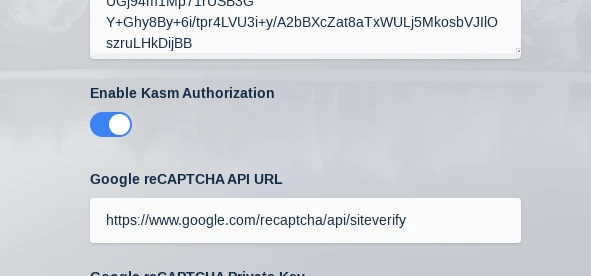
With the proxy running you will need to login to your Kasm Workspaces installation as an administrator and navigate to Admin->Settings->Global->Authentication->Kasm Auth Domain. Change this setting to example.com and click Save.
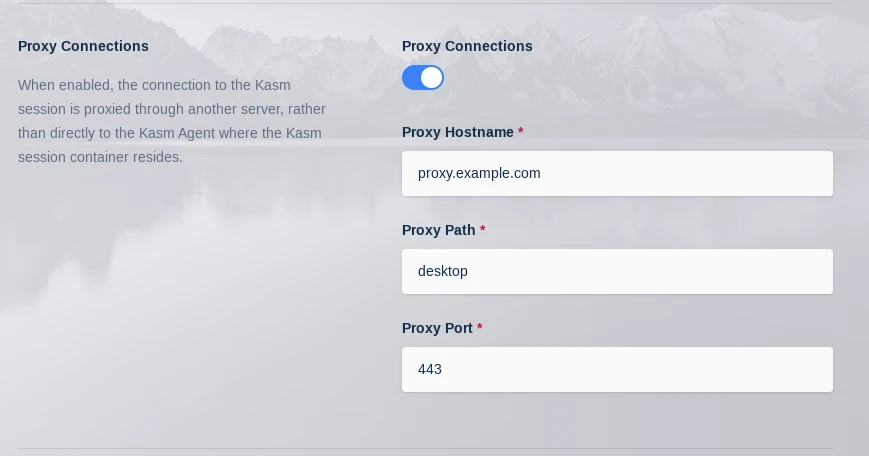
Next navigate to Admin->Infrastructure->Zones->Click the arrow next to the zone you want to point to the Proxy->Edit Set Proxy Hostname to proxy.example.com
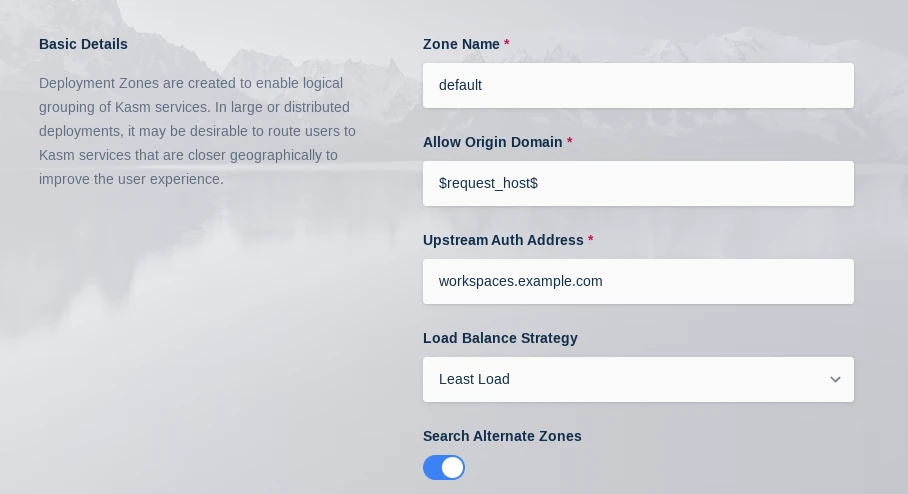
While in this menu also set Upstream Auth Address to workspaces.example.com
With these setting changed we need to restart the API server container on the Web App server/s:
sudo docker restart kasm_api
When a user now deploys a Kasm Workspace their streaming session will be served up by this new external proxy instead of the default one deployed with the Web App role.
Install troubleshooting
The install.sh script creates a log file as it runs, this file is removed upon completion of a successful installation. However, if something does go wrong the logfile will be available from the directory the install.sh script was executed from in the format kasm_install_${TIMESTAMP}.log. This file will be important for diagnosing the error that caused the installation to fail and will be requested when submitting a support ticket with Kasm Technologies.