Recover Kasm Workspaces components from expired tokens
Overview
Kasm Workspaces components authenticate to the Admin API with tokens that refresh automatically. Starting with version 1.18, a token refresh workflow improves security and simplifies maintenance. Some scenarios prevent a component from refreshing in time, such as extended maintenance windows or infrastructure that is powered down when not in use. This guide recognizes service disruptions caused by token desync between components and re-registers a component that has an expired token.
A settings grace period allows a limited time after expiration to exchange an expired token for a new one. During this period, the expired token cannot authorize service calls. It can only be exchanged for a new token. When a token expires, the client re-establishes trust with the Admin API by providing the same registration token used during the initial deployment. In a non-Kubernetes environment, place this registration token in a file named registration_token.txt, which is deleted automatically after use. In a Kubernetes deployment, set the registration token as an environment variable from a Secret, which makes the service fully self-healing.
The following flowchart illustrates the component logic when refreshing a token.
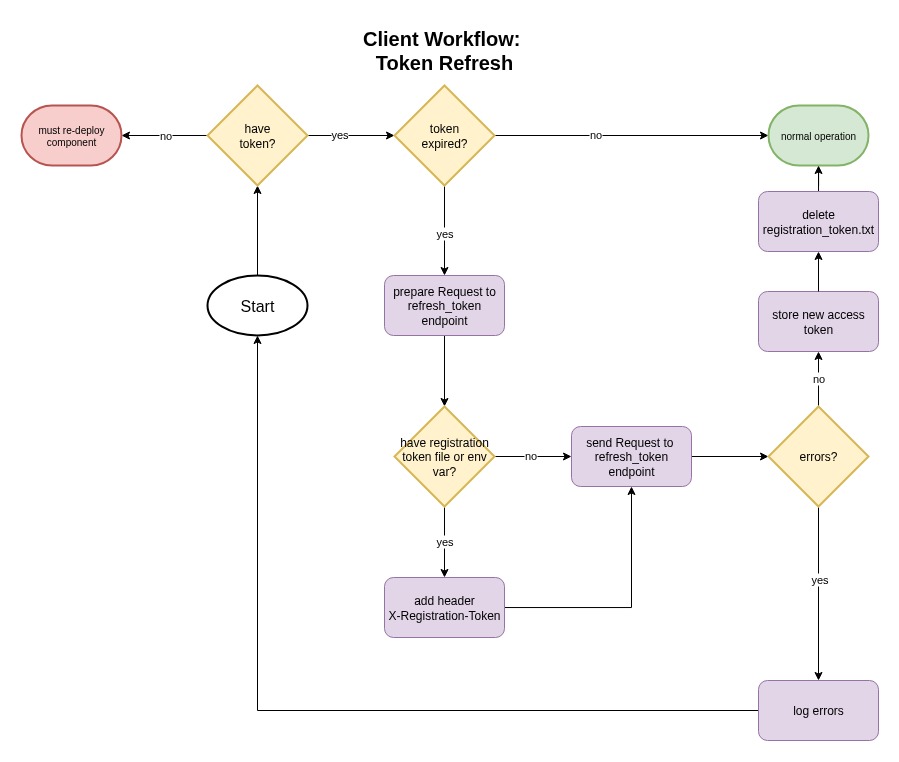
When the client has no existing token at all, redeploy the service as if it is a new component.
Prerequisites
- Administrator access to the Kasm Workspaces deployment and to the affected component host.
- The current Component Registration Token.
Solution approach
This guide progresses through the following phases:
- Recognize authentication token issues.
- Recover the component.
Detailed steps
Recognize authentication token issues
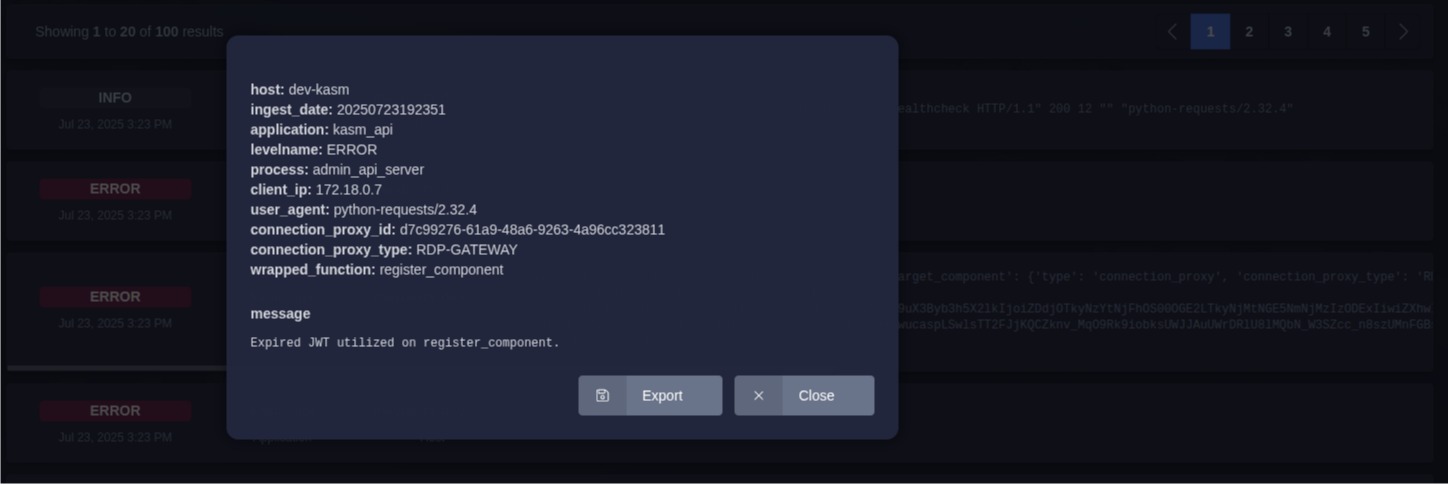
Determine whether a Kasm service has lost authentication with the Admin API from the Kasm administrative logs or the console output of the component. Messages that indicate an expired token include The JWT token has expired and Expired JWT utilized on register_component. The following screenshot shows the RDP Proxy component of a single-server installation that has lost authentication:
The following console output comes from that RDP Proxy, which was turned off long enough to miss the token refresh window:
Jul 23 18:47:04 INFO (7/7) -- ReDemPtion 12.0.11 starting
2025-07-23 18:47:05,188 [INFO] __main__.handler: Refreshing auth token which expires 2025-07-23 18:45:47
2025-07-23 18:47:05,274 [ERROR] __main__.handler: Error from Kasm server for api: https://proxy:443/api/admin/refresh_token status: 403 error: No response
2025-07-23 18:47:05,275 [ERROR] __main__.handler: Failed to refresh auth token
2025-07-23 18:47:05,344 [ERROR] __main__.handler: Error from Kasm server for api: https://proxy:443/api/admin/register_component status: 200 error: The JWT token has expired.
2025-07-23 18:47:05,344 [WARNING] __main__.handler: Failed to register component on attempt: 1
Recover the component
Re-register a component that has an expired token by placing a text file named registration_token.txt in the appropriate directory, with the contents of the current Component Registration Token. The file contents look like the following, and trailing newlines are ignored:
MjAyNzk0MmUtZjQzMS00NDZlLWFkODMtOGU2OWVmMzk3MGQx
Each component uses a differently named config file, but the registration_token.txt file must use that exact name and sit alongside the correct config file. The standard config file paths for each component on the host machine, mounted into the service containers for a single-server installation, are:
- Agent:
/opt/kasm/current/conf/app/agent/agent.app.config.yaml - Guac:
/opt/kasm/current/conf/app/guac/kasmguac.app.config.yaml - RDP Gateway:
/opt/kasm/current/conf/app/rdp_gateway/passthrough.app.config.yaml - RDP HTTPS Gateway:
/opt/kasm/current/conf/app/rdp_https_gateway/rdp_https_gateway.app.config.yaml - Windows Server:
C:\Program Files\Kasm\config.yaml - Linux Server:
/etc/kasm-desktop-service/config.yaml
For this example, recover the RDP Gateway by creating the registration token file at /opt/kasm/current/conf/app/rdp_gateway/registration_token.txt. The service does not need a restart, because it detects the new file on its next attempt to refresh the expired token, typically within 30 seconds based on the default heartbeat interval. A successful refresh produces output such as the following:
2025-07-23 20:09:26,774 [DEBUG] __main__.handler: Loaded registration token from /usr/local/etc/rdpproxy/conf/registration_token.txt
2025-07-23 20:09:26,886 [INFO] __main__.handler: New auth token expires 2025-07-23 20:11:27
2025-07-23 20:09:26,891 [INFO] __main__.handler: Successfully removed registration token file at /usr/local/etc/rdpproxy/conf/registration_token.txt
2025-07-23 20:09:27,007 [INFO] __main__.handler: Component registration successful
The Loaded registration token and Successfully removed registration token file lines confirm that the component used the registration token and then cleaned up automatically.
Common troubleshooting steps
- A desktop agent does not recover automatically. Windows and Linux desktop agents may not recover after you create the
registration_token.txtfile. Restart the service manually. - The component has no existing token. Redeploy the service as a new component, because there is no token to exchange.