Operate and troubleshoot Kasm Workspaces egress
Overview
Egress routing relies on a Docker network plugin that manages session networking, including interface setup, routing rules, and provider-specific tunnel handling. This guide covers the runtime details, logs, and operational tasks needed to keep egress healthy. It explains where to read diagnostics, how to work through a failed connection, and how to restart or upgrade the network plugin safely. Use it to resolve egress issues and to perform routine plugin maintenance.
Prerequisites
Before you begin, confirm the following:
- Shell access to the Agent host that runs the egress sessions, with permission to run
dockercommands. - An egress provider already configured for the deployment. For setup, see the egress overview.
- A maintenance window with no active egress workspaces on the target Agent before restarting or upgrading the plugin.
Runtime implementation and logs
The network plugin manages session networking on each Agent. Review the primary logs for setup and connection behavior:
/var/log/kasm-sidecar/network_sidecar.log: network setup, tunnel behavior, and policy or routing actions./var/log/kasm-sidecar/plugin.log: Docker engine interactions made by the sidecar plugin.
Plugin runtime files are written under /var/run/kasm-sidecar/$container_namespace.
To retrieve a container namespace, run:
docker inspect -f '{{.NetworkSettings.SandboxKey}}' $container_name | grep -o -E "[a-h0-9]+$"
Egress environment variables
When egress is enabled for a session, Kasm can expose these variables in the container:
KASM_EGRESS_GATEWAY_NAME
KASM_EGRESS_GATEWAY_CITY
KASM_EGRESS_GATEWAY_COUNTRY
KASM_EGRESS_PROVIDER_NAME
For example:
KASM_EGRESS_PROVIDER_NAME=PureVPN
KASM_EGRESS_GATEWAY_NAME=AU-MELBOURNE-31
KASM_EGRESS_GATEWAY_COUNTRY=AU
KASM_EGRESS_GATEWAY_CITY=Melbourne
To disable this exposure, set EXPOSE_EGRESS_ENVIRONMENT_VARS=0 in the Docker Run Config:
{
  "environment": {
    "EXPOSE_EGRESS_ENVIRONMENT_VARS": "0"
  }
}
Troubleshoot a failed egress connection
When a session cannot connect to an egress provider, the launch flow shows an error to the user.
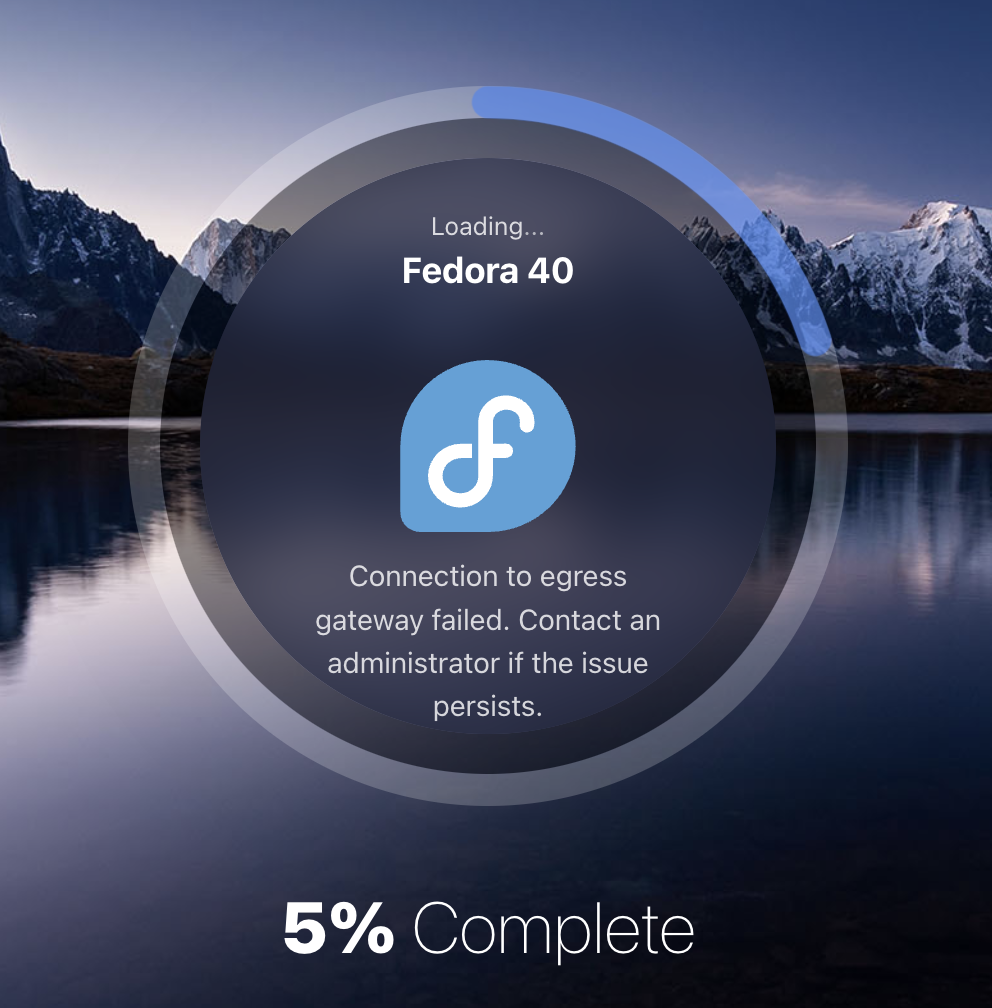
Work through this checklist:
-
Verify plugin health with
docker plugin ls. -
Review
/var/log/kasm-sidecar/network_sidecar.logfor setup and connection errors. -
Validate provider config files under
/var/run/kasm-sidecar/$container_namespace/$vpn, for example.../wg/wg.conf. -
Confirm
kasm_proxyis attached to the sidecar network bridge withdocker exec -it kasm_proxy ip a. The interface name follows the patternk-p-p-*. -
Validate session routes with
docker exec -it kasm_proxy ip route, and verify that traffic leaves on the plugin interface:default via 172.20.0.1 dev k-p-1389f8172.20.0.0/16 dev k-p-1389f8 proto kernel scope link src 172.20.0.3 -
Confirm hostname resolution for
KASM_API_HOSTby inspecting the containerenvand/etc/hosts:> docker exec -it $CONTAINER_NAME env | grep KASM_API_HOSTKASM_API_HOST=proxy> docker exec -it $CONTAINER_NAME cat /etc/hostsfe00::0 ip6-localnetff00::0 ip6-mcastprefixff02::1 ip6-allnodesff02::2 ip6-allrouters172.20.0.2 proxy172.20.0.3 505c32d766d9 -
Inspect namespace
iptablesrules withnsenter --net=$container_namespace iptables -L -v -n:Chain INPUT (policy ACCEPT 0 packets, 0 bytes)pkts bytes target prot opt in out source destination897 131K ACCEPT 0 -- k-p-1389f8 * 172.20.0.2 0.0.0.0/0 # <-- kasm_proxy IP address20581 4534K ACCEPT 0 -- lo * 0.0.0.0/0 0.0.0.0/00 0 ACCEPT 0 -- tun0 * 0.0.0.0/0 0.0.0.0/025 7620 ACCEPT 0 -- wg * 0.0.0.0/0 0.0.0.0/00 0 ACCEPT 0 -- * * 172.20.0.0/16 0.0.0.0/0 # <-- kasm_sidecar_network IP range28 9644 ACCEPT 0 -- * * XXX.XXX.XX.XX 0.0.0.0/0 # <-- VPN server IPChain OUTPUT (policy ACCEPT 0 packets, 0 bytes)pkts bytes target prot opt in out source destination78 16678 ACCEPT 6 -- * k-p-1389f8 0.0.0.0/0 172.20.0.2 tcp dpt:443 # <-- kasm_proxy IP address20581 4534K ACCEPT 0 -- * lo 0.0.0.0/0 0.0.0.0/00 0 ACCEPT 0 -- * tun0 0.0.0.0/0 0.0.0.0/027 2340 ACCEPT 0 -- * wg 0.0.0.0/0 0.0.0.0/01125 4567K ACCEPT 0 -- * * 0.0.0.0/0 172.20.0.0/16 # <-- kasm_sidecar_network IP range29 4464 ACCEPT 0 -- * * 0.0.0.0/0 XXX.XXX.XX.XX # <-- VPN server IP
Restart the network plugin
For issues not caused by a VPN misconfiguration, as covered in steps 4 through 7 of the troubleshooting checklist, restart the plugin with the following script.
Confirm that no active workspaces using egress are running on the target Agent before restarting the plugin.
# disconnect kasm_proxy from the plugin network
plugin_name=$(docker network inspect kasm_sidecar_network --format '{{.Driver}}')
docker network disconnect kasm_sidecar_network kasm_proxy

# restart the plugin
docker network rm kasm_sidecar_network
docker plugin disable $plugin_name
docker plugin enable $plugin_name

# reconnect kasm_proxy to the plugin network
docker network create -d $plugin_name kasm_sidecar_network
docker network connect kasm_sidecar_network kasm_proxy
Some VPN providers, such as Private Internet Access, may use configurations that the latest package versions in the Kasm network plugin do not support. This can cause connections to fail or time out. For details, see this OpenSSL GitHub discussion.
Upgrade the network plugin
Docker or dependency changes occasionally require a plugin upgrade.
Confirm that no active workspaces using egress are running on the target Agent before performing this upgrade.
# disconnect kasm_proxy from the plugin network
plugin_name=$(docker network inspect kasm_sidecar_network --format '{{.Driver}}')
plugin_reference=$(docker plugin inspect $plugin_name --format '{{.PluginReference}}')
docker network disconnect kasm_sidecar_network kasm_proxy

# upgrade the plugin
docker network rm kasm_sidecar_network
docker plugin disable $plugin_name
docker plugin rm $plugin_name
docker plugin install --alias $plugin_name --grant-all-permissions $plugin_reference

# reconnect kasm_proxy to the plugin network
docker network create -d $plugin_name kasm_sidecar_network
docker network connect kasm_sidecar_network kasm_proxy
Forensics and geolocation considerations
Egress gateways can support forensic and location-sensitive workflows, but they are not a complete attribution solution on their own. Keep these points in mind:
- A VPN egress IP alone may not satisfy a full forensic profile. Browser locale, time zone, and profile-level settings can still expose mismatches.
- Geolocation databases vary by provider and service. Different websites may report different locations for the same exit IP.
- Shared commercial VPN IPs can trigger additional anti-abuse checks, such as CAPTCHAs.
For dedicated IP and managed attribution requirements, contact Kasm sales for an enterprise architecture review.