Run Kasm Workspaces behind a reverse proxy
Overview
Running Kasm Workspaces behind a reverse proxy such as Nginx or Caddy lets a single front-end terminate TLS and route traffic to the deployment. A few specific settings are required so that connections flow correctly between the proxy and Kasm. This guide moves Kasm to a non-standard port, configures the proxy for subdomain or path routing, and updates the deployment zones. As a result, clients reach Kasm sessions through the proxy without connection failures.
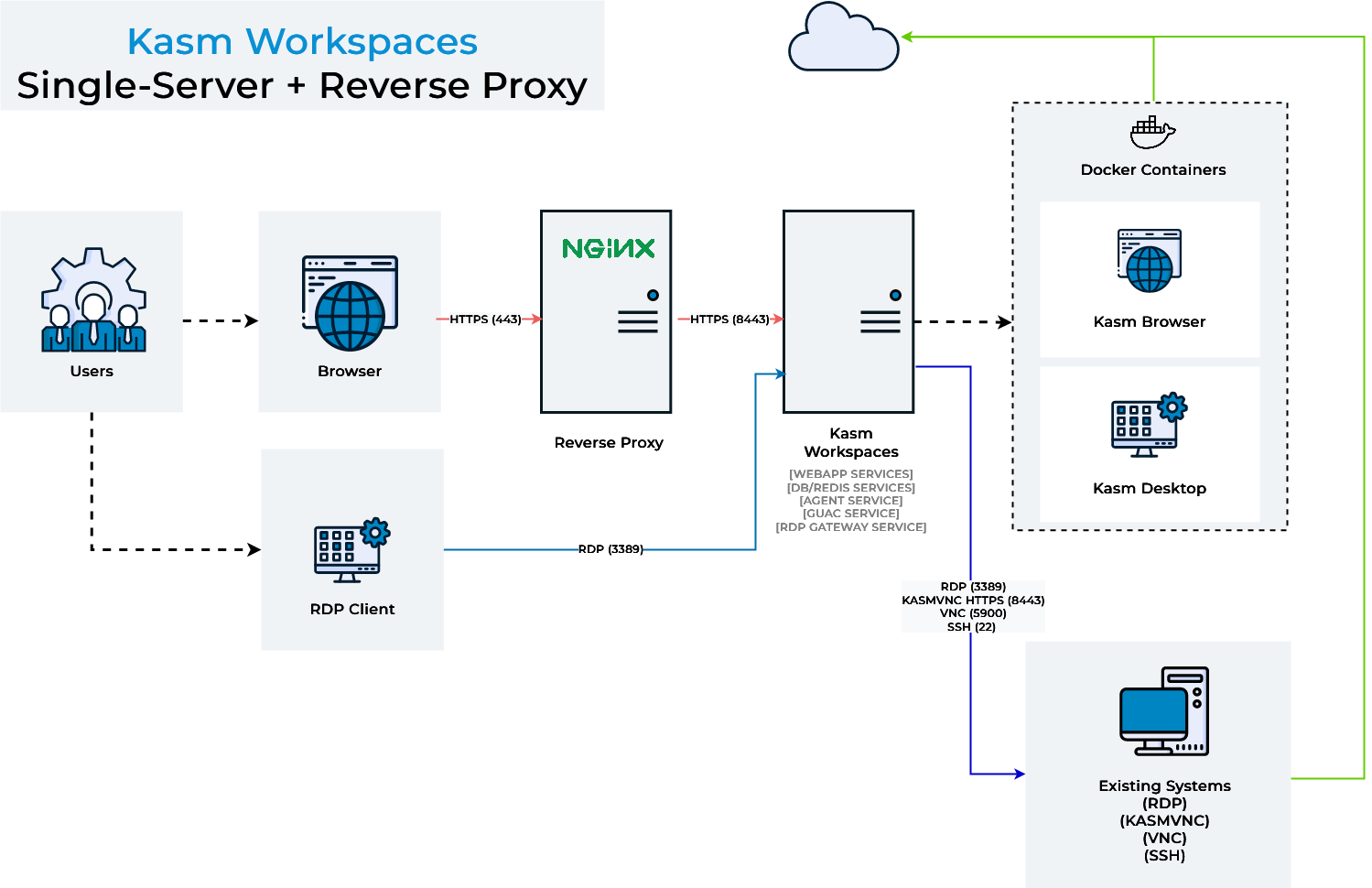
Once Kasm is placed behind a reverse proxy, update the zone configuration. See Update zones.
Prerequisites
Before you begin, confirm the following:
- Administrator access to the Kasm Workspaces deployment.
- A reverse proxy server such as Nginx, Caddy, HAProxy, or Apache, with permission to edit its configuration.
- The IP address or FQDN that clients use to reach the proxy.
Solution approach
This guide progresses through the following phases:
- Run Kasm Workspaces on a non-standard port so the proxy can use port 443.
- Configure the reverse proxy for subdomain or path routing.
- Update the deployment zones.
Detailed steps
Run Kasm Workspaces on a non-standard port
By default, Kasm Workspaces listens on port 443. To let the reverse proxy use port 443, run Kasm on another port.
-
During installation, pass the -L flag to choose a different port. For example:
sudo bash kasm_release/install.sh -L 8443 -
Access Kasm Workspaces through the defined port, for example
https://kasm.server:8443.
Configure the reverse proxy
Kasm supports proxying through subdomains, for example https://kasm1.example.com/ and https://kasm2.example.com/, or through paths, for example https://example.com/kasm1/ and https://example.com/kasm2/. Choose the model that fits your environment.
Proxy through a subdomain
Use a dedicated server_name for traffic destined for Kasm, for example https://kasm.example.com/. For details, see the Nginx server names documentation. The following examples listen on port 443 and proxy to Kasm Workspaces on port 8443.
- Nginx
- Caddy
- HAProxy
- Apache
 server {
     listen 443 ssl;
     server_name kasm.example.com;
     ssl_certificate /etc/nginx/ssl/nginx.crt;
     ssl_certificate_key /etc/nginx/ssl/nginx.key;

     location / {
         # The following configurations must be set when proxying to Kasm Workspaces

         # WebSocket support
         proxy_set_header        Upgrade $http_upgrade;
         proxy_set_header        Connection "upgrade";

         # Host and X headers
         proxy_set_header        Host $host;
         proxy_set_header        X-Real-IP $remote_addr;
         proxy_set_header        X-Forwarded-For $proxy_add_x_forwarded_for;
         proxy_set_header        X-Forwarded-Proto $scheme;
         # Should match the listening port of this proxy
         proxy_set_header        X-Forwarded-Port 443;

         # Connectivity options
         proxy_http_version      1.1;
         proxy_read_timeout      1800s;
         proxy_send_timeout      1800s;
         proxy_connect_timeout   1800s;
         proxy_buffering         off;

         # Allow large requests to support file uploads to sessions
         client_max_body_size 10M;

         # Proxy to Kasm Workspaces running locally on 8443 using SSL
         proxy_pass https://127.0.0.1:8443 ;
     }
 }
To serve another application from the same proxy, define a second server block with its own server_name:
 server {
     listen 443 ssl;
     server_name app1.example.com;
     ssl_certificate /etc/nginx/ssl/nginx.crt;
     ssl_certificate_key /etc/nginx/ssl/nginx.key;

     location / {
         return 200 'App 1';
         add_header Content-Type text/plain;
     }
 }
This Caddy v2 config listens on kasm.example.com and reverse-proxies to Kasm on https://127.0.0.1:8443. The tls_insecure_skip_verify option skips TLS certificate verification. For more information, see the Caddy reverse_proxy documentation.
kasm.example.com {
reverse_proxy https://127.0.0.1:8443 {
  transport http {
    tls_insecure_skip_verify
  }
  header_up Host {host}
  # Should match the listening port of this proxy
  header_up X-Forwarded-Port "443"
  header_up X-Real-IP {remote_host}
  header_up X-Forwarded-For {remote_host}
  header_up X-Forwarded-Proto {scheme}
}
}
This HAProxy config listens on port 443 and proxies to Kasm Workspaces on port 8443.
 global
         log /dev/log    local0
         log /dev/log    local1 notice
         chroot /var/lib/haproxy
         stats socket /run/haproxy/admin.sock mode 660 level admin expose-fd listeners
         stats timeout 30s
         user haproxy
         group haproxy
         daemon

         # Default SSL material locations
         ca-base /etc/ssl/certs
         crt-base /etc/ssl/private

         ssl-default-bind-ciphers ECDH+AESGCM:DH+AESGCM:ECDH+AES256:DH+AES256:ECDH+AES128:DH+AES:RSA+AESGCM:RSA+AES:!aNULL:!MD5:!DSS
         ssl-default-bind-options no-sslv3

 defaults
         log     global
         mode    http
         option  httplog
         option  dontlognull
         timeout connect 5000
         timeout client  50000
         timeout server  50000
         errorfile 400 /etc/haproxy/errors/400.http
         errorfile 403 /etc/haproxy/errors/403.http
         errorfile 408 /etc/haproxy/errors/408.http
         errorfile 500 /etc/haproxy/errors/500.http
         errorfile 502 /etc/haproxy/errors/502.http
         errorfile 503 /etc/haproxy/errors/503.http
         errorfile 504 /etc/haproxy/errors/504.http

 frontend localhost
        bind *:443 ssl crt /tmp/all.pem alpn http/1.1
        redirect scheme https if !{ ssl_fc }
        mode http
        default_backend node

 backend node
         mode http
         option forwardfor
         server kasm 127.0.0.1:8443 check ssl verify none
         http-request set-header X-Forwarded-Port %[dst_port]
         http-request add-header X-Forwarded-Proto https if { ssl_fc }
This Apache config listens on port 443 and proxies to Kasm Workspaces on port 8443.
 <VirtualHost *:443>
   # Server and SSL
   ServerName kasm.example.com
   SSLEngine on
   SSLCertificateFile /etc/ssl/apache2/server.pem
   SSLCertificateKeyFile /etc/ssl/apache2/server.key
   # WebSocket upgrade
   RewriteEngine on
   RewriteCond ${HTTP:Upgrade} websocket [NC]
   RewriteCond ${HTTP:Connection} upgrade [NC]
   RewriteRule .* "wss://127.0.0.1:8443/$1" [P,L]
   # Proxy
   SSLProxyEngine on
   SSLProxyVerify none
   SSLProxyCheckPeerCN off
   SSLProxyCheckPeerName off
   SSLProxyCheckPeerExpire off
   ProxyPreserveHost on
   ProxyPass / https://127.0.0.1:8443/
   ProxyPassReverse / https://127.0.0.1:8443/
   ProxyRequests off
   RequestHeader set X-Forwarded-Proto https
   # Should match the listening port of this proxy
   RequestHeader set X-Forwarded-Port 443
 </VirtualHost>
Proxy through a path
Path proxying needs the same headers as subdomain proxying. In the example below, most settings are placed outside the location block so they apply to all locations. Adjust this to suit your needs.
-
Set the global Proxy Path setting:
- Select Settings > Global from the navigation menu.
- Find the Proxy Path setting and update the value to match the path for this server. The value starts with a leading slash. For example, if the address bar shows
https://example.com/kasm1/#/settings, enter/kasm1.

Updating the Proxy Path warningDo not use paths that overlap, such as
/kasmand/kasm2, because they cause conflicts. This applies only to an exact overlap from the start, including the slash. For example,/kasmand/mykasmare fine, but/serverand/servers-usare not. On initial login, a cookie is set for the root/location. After you set a path value, log out, and log in again, the correct cookie is set, but the original root cookie still exists. Clear cookies before logging in to prevent conflicts during first setup. -
Configure the Nginx server with a
locationblock for each path:server {listen 443 ssl;server_name example.com;ssl_certificate /etc/nginx/ssl/nginx.crt;ssl_certificate_key /etc/nginx/ssl/nginx.key;# The following configurations must be set when proxying to Kasm Workspaces# WebSocket supportproxy_set_header Upgrade $http_upgrade;proxy_set_header Connection "upgrade";# Host and X headersproxy_set_header Host $host;proxy_set_header X-Real-IP $remote_addr;proxy_set_header X-Forwarded-For $proxy_add_x_forwarded_for;proxy_set_header X-Forwarded-Proto $scheme;# Should match the listening port of this proxyproxy_set_header X-Forwarded-Port 443;# Connectivity optionsproxy_http_version 1.1;proxy_read_timeout 1800s;proxy_send_timeout 1800s;proxy_connect_timeout 1800s;proxy_buffering off;# Allow large requests to support file uploads to sessionsclient_max_body_size 10M;location /kasm1/ {# Proxy to Kasm Workspaces running locally on 8443 using SSLproxy_pass https://127.0.0.1:8443/;}location /kasm2/ {# Proxy to Kasm Workspaces running externally over SSLproxy_pass https://kasm.example.com/;}}
Update zones
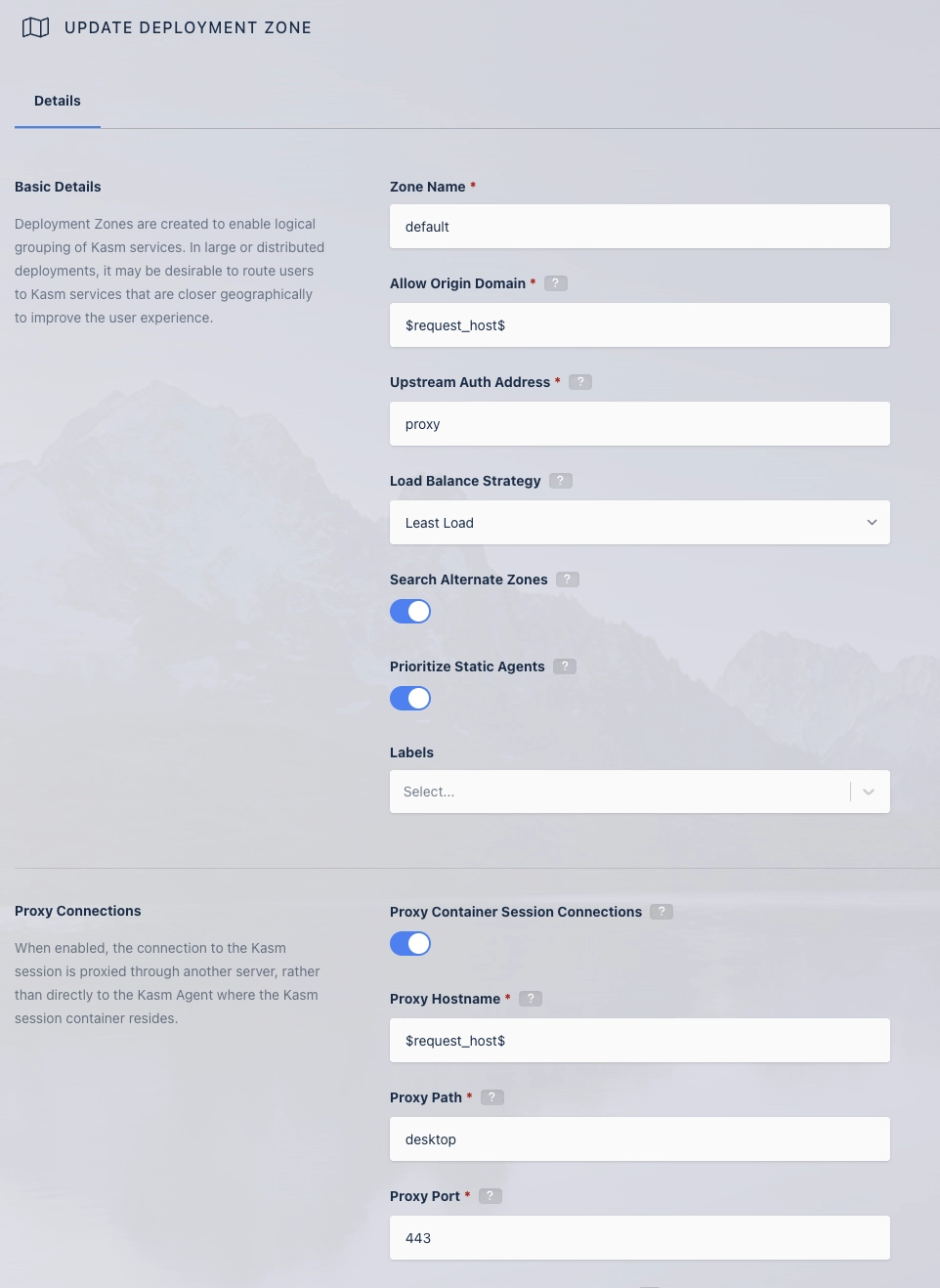
For clients to connect to Kasm sessions through a reverse proxy, update the Upstream Auth Address and Proxy Port settings for each deployment zone. Set Proxy Port to 0 so Kasm Workspaces determines the correct port from window.location.port. Set Upstream Auth Address to either the word proxy or the IP or FQDN of the Kasm Workspaces server. In a single-server installation, use the server address. In a multi-server deployment, use the IP or FQDN of the Web App role for that zone.
Updates to zone settings apply to new sessions created after the change. Existing resumed sessions do not receive the changes.
- Log into the Kasm Workspaces UI as an administrator.
- Select Infrastructure > Zones.
- Edit the default zone.
- Change the Upstream Auth Address setting to
proxyor the IP or FQDN of the Kasm Workspaces server. For path proxying in a multi-server setup, use the IP or FQDN that points directly to the upstream server. - Change the Proxy Port setting to 0.
- Repeat for each additional zone.
When using the RDP local client workspace option, disable the Restrict RDP Client IP Address setting in Infrastructure > Zones. Otherwise, the client may not connect, because the stored request IP differs over a reverse proxy. The Error Logs report this with a message such as Invalid Request. Wrong client IP.
Common troubleshooting steps
- Sessions fail to connect after adding the proxy. Confirm the deployment zones are updated, with Proxy Port set to 0 and Upstream Auth Address set correctly. For more help, see the reverse proxy troubleshooting guide.
- The connection drops or WebSockets fail. Confirm the proxy forwards the
UpgradeandConnectionheaders and uses HTTP version 1.1, as shown in the examples. - RDP local client sessions report a wrong client IP. Disable Restrict RDP Client IP Address in Infrastructure > Zones, because the stored IP differs over a reverse proxy.
- Path-based login conflicts. Clear browser cookies before logging in for the first time after setting a Proxy Path value.