AutoScale configuration settings for Docker Agent Pools
AutoScale provisions and destroys Kasm Agent capacity automatically in response to demand. This reference describes the AutoScale configuration settings for Pools of type Docker Agent. AutoScale helps reduce idle infrastructure and keeps workspace capacity ready for bursty contractor, training, investigation, and AI workloads.
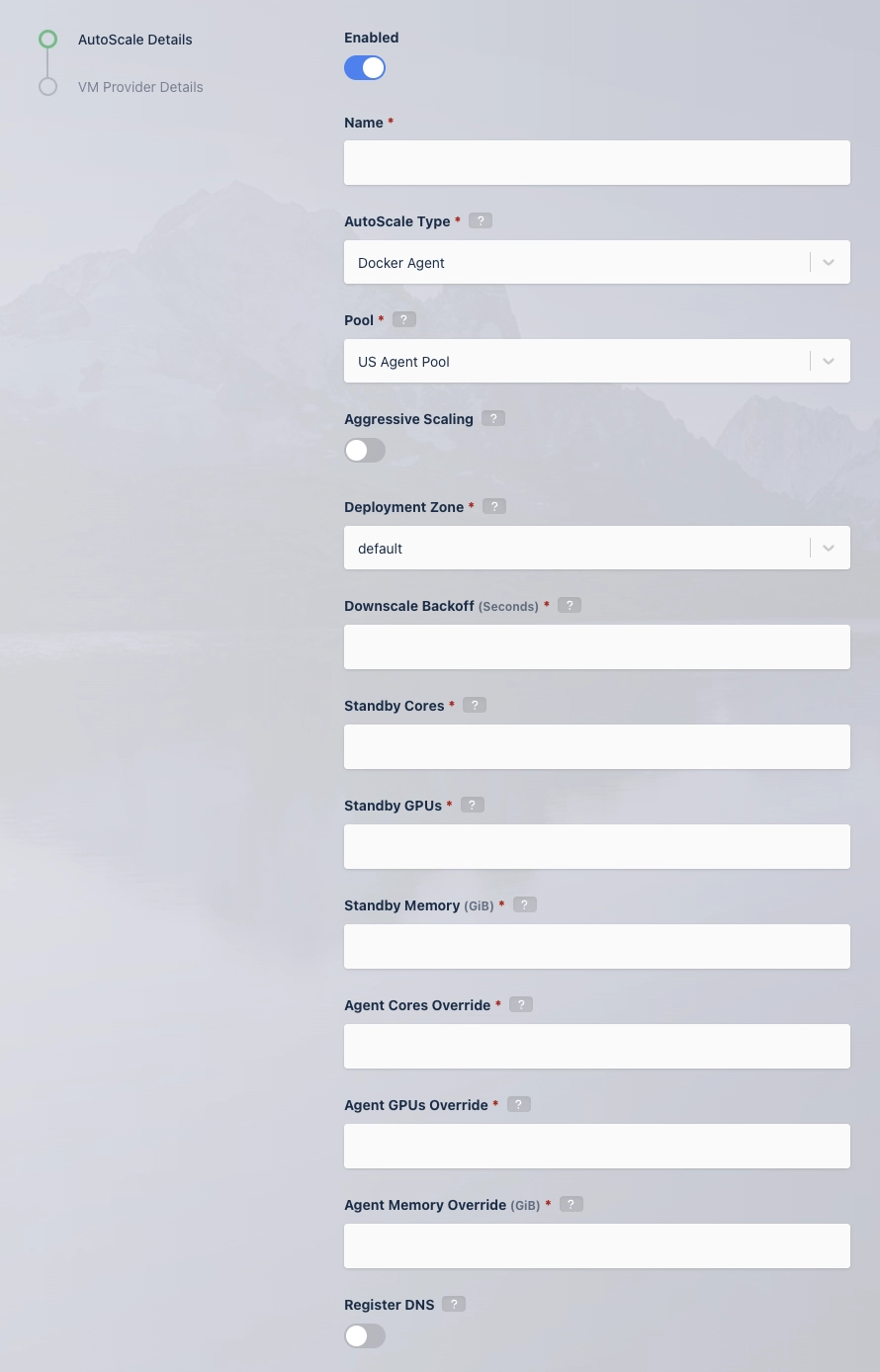
AutoScale settings for Agent Pool
Many of the settings below apply to the agents created during AutoScaling. Changes to an AutoScale config do not apply automatically to existing agents. Update each existing agent created from that config manually.
The following table describes each AutoScale setting for a Docker Agent Pool.
| Name | Description |
|---|---|
| Enabled | Controls whether this config is active. When the config is disabled, AutoScaled agents from it cannot be deleted manually. Re-enable the config to remove them. |
| Name | The name for the AutoScale config. |
| AutoScale Type | The type of AutoScale config, either Docker Agent or Server. |
| Pool | The pool this AutoScale config is attached to. |
| Aggressive Scaling | When enabled, the system takes more expedient measures to provision raw compute resources for on-demand session requests. See Aggressive Scaling for more details. |
| Deployment Zone | The deployment zone this AutoScale config applies to. |
| Downscale Backoff (Seconds) | Prevents the system from downscaling, meaning deleting agents, for this number of seconds. This setting prevents the system from thrashing up and down when available resources hover around an interval that would otherwise trigger AutoScaling. |
| Standby Cores | The number of standby cores to keep always available at any given time, in addition to those needed to satisfy the Staging Config requirements. When available cores fall below this number, more agents are created. When available cores rise above this number, agents are deleted, provided the deletion does not drop available cores below this number. A value of 0 means no additional standby compute is created, and the AutoScaler provisions only enough compute to satisfy the Staging Config requirements. |
| Standby GPUs | The number of standby GPUs to keep always available at any given time, in addition to those needed to satisfy the Staging Config requirements. When available GPUs fall below this number, more agents are created. When available GPUs rise above this number, agents are deleted, provided the deletion does not drop available GPUs below this number. A value of 0 means no additional standby compute is created, and the AutoScaler provisions only enough compute to satisfy the Staging Config requirements. |
| Standby Memory | The amount of memory to keep always available at any given time, in addition to that needed to satisfy the Staging Config requirements. When available memory falls below this amount, more agents are created. When available memory rises above this amount, agents are deleted, provided the deletion does not drop available memory below this amount. The UI stores values as bytes (standby_memory_bytes), and the unit selector supports Bytes, MiB, and GiB. When using the Admin API, supply the number of bytes. A value of 0 means no additional standby compute is created, and the AutoScaler provisions only enough compute to satisfy the Staging Config requirements. |
| Agent Cores Override | When an agent is created, the compute resource, such as an AWS EC2 instance or a DigitalOcean Droplet, has a fixed amount of CPU and RAM defined by the cloud provider instance type. Set this value to match the instance type, or set it to a preferred value. |
| Agent GPUs Override | When an agent is created, the compute resource, such as an AWS EC2 instance or a DigitalOcean Droplet, has a fixed number of GPUs defined by the cloud provider instance type. Set this value to match the instance type, or set it to a higher number to allow oversubscribing. |
| Agent Memory Override | When an agent is created, the compute resource, such as an AWS EC2 instance or a DigitalOcean Droplet, has a fixed amount of CPU and RAM defined by the cloud provider instance type. Set this value to match the instance type, or set it to a preferred value. The UI stores the value as bytes (agent_memory_override_bytes) and exposes a unit selector with Bytes, MiB, and GiB. API clients must send the number of bytes. |
| Rotate Agent in (Days) | The number of days until agents are drained and replaced with new agents. This setting defines the drain time of the agent when it is created. A value of 0 disables this function. Existing agents are not updated when this field changes. To apply new rotation settings to existing agents, update each existing agent manually. |
| Pre Warm Rotated Agent Replacements for (Minutes) | The number of minutes before the agent drain time that Kasm begins provisioning a replacement agent. This window allows time for a replacement agent to install before the old agent rotates out. A value of 0 disables this function. |
| Register DNS | When enabled, the agent IP address is registered in DNS. |
| Base Domain Name | A base name for automatic DNS registration of the agent. The system creates a full name using the format <ID>.<Base Domain Name>. When the Base Domain Name is agents.kasm.example.com, the generated DNS name is <ID>.agents.kasm.example.com, for example 123abcd.agents.kasm.example.com. The Base Domain Name must already be a registered DNS zone within the cloud provider DNS system. |
After completing these settings, select Next to enter the provider-specific details.
Pre-load workspace images on agents
Pre-loading workspace images on provisioned agents eliminates delays caused by image downloads after the VMs come online. Follow the Pre-load Workspace Images on Agents guide to fetch workspace images with the Kasm API and bake them into VM templates for faster, more efficient AutoScaling.
Provider-specific settings
Kasm supports AutoScaling on a variety of providers. Each provider has unique configurations that must be set up correctly for optimal performance. Select your provider to learn more: