Workspace launch form Launch Config schema
A workspace launch form presents custom input fields to a user when they launch a Workspaces session. The Launch Config property on a Workspace entry defines the JSON schema for that form. When a user selects the Workspace from the launcher, Kasm renders the form to gather input. This page describes the structure of the Launch Config schema and every field it accepts.
Kasm writes the submitted values to a file inside the session at a path you define. An administrator then uses a startup script to read that file and act on the values. For the procedure that uses this schema, see Workspaces.
This feature is available on container-based Workspaces. It is also available on Server and Server Pool Workspaces when the Kasm Desktop Service is installed.
Schema structure
The Launch Config JSON schema requires two top-level keys:
file_mapping: Describes where Kasm writes the user's form selections inside the session. This key uses the File Mapping feature.launch_form: Describes the form elements that Kasm presents to the user.
Example Launch Config JSON
{
  "file_mapping": {
    "destination": "/tmp/launch_selections.json"
  },
  "launch_form": [
    {
      "key": "tailscale_key",
      "label": "Tailscale Auth Key",
      "value": null,
      "allow_saving": true,
      "placeholder": "tskey-auth-xyz",
      "required": false,
      "help": "Authentication key used to establish the Tailscale connection",
      "input_type": "text",
      "options": [],
      "validator_regex": null,
      "validator_regex_description": null,
      "display_if": null
    }
  ]
}
file_mapping
An object that describes where Kasm writes the JSON file containing the user's form selections inside the Workspace session.
{
  "file_mapping": {
    "destination": "/tmp/launch_selections.json",
    "is_readable": true,
    "is_writeable": false,
    "is_executable": false
  }
}
Properties
-
destination* string: The file path where Kasm writes the user's launch selections. The file is JSON formatted. Since this feature uses File Mapping, Windows Sessions can use special environment variables when defining the path.
-
is_readable bool: If
true(default), the file is readable. -
is_writeable bool: If
false(default), Kasm mounts the file as a read-only filesystem. -
is_executable bool: If
false(default), the file is not marked as executable.
launch_form
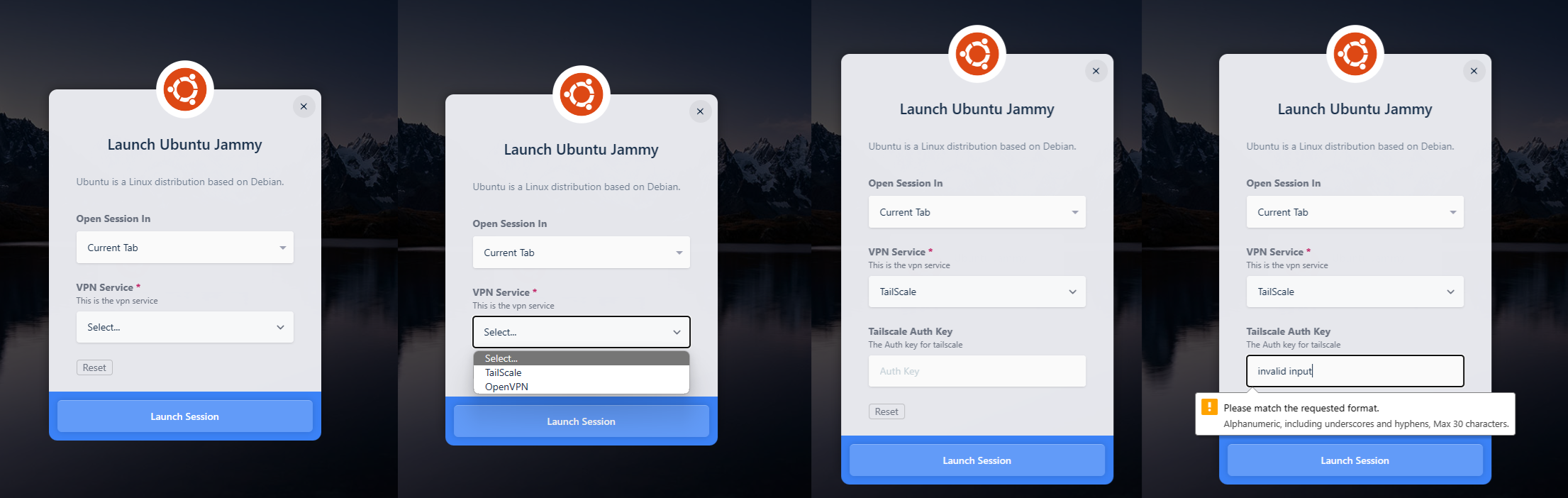
An array of objects, with order implied, that describes the individual form elements presented to the user. The schema supports multiple element types, conditions that control when an element displays, and input validation options.
{
  "launch_form": [
    {
      "key": "vpn_service",
      "label": "VPN Service",
      "value": null,
      "allow_saving": true,
      "required": true,
      "placeholder": null,
      "help": "This is the vpn service",
      "input_type": "select",
      "options": [
        {
          "value": "tailscale",
          "label": "TailScale"
        },
        {
          "value": "openvpn",
          "label": "OpenVPN"
        }
      ],
      "validator_regex": null,
      "validator_regex_description": null,
      "display_if": null
    },
    {
      "key": "tailscale_key",
      "label": "Tailscale Auth Key",
      "allow_saving": true,
      "value": null,
      "placeholder": "Auth Key",
      "required": false,
      "help": "The Auth key for tailscale",
      "input_type": "text",
      "options": [],
      "validator_regex": "[\\w\\-]{0,30}",
      "validator_regex_description": "Alphanumeric, including underscores and hyphens, Max 30 characters.",
      "display_if": [
        {
          "key": "vpn_service",
          "value_regex": "tailscale"
        }
      ]
    }
  ]
}
Properties
-
key* string: A unique name for the item. This value is not user facing. Kasm uses the same key in the selection output.
-
label* string: A user-facing name for the item.
-
value* string or array of strings: The default value for the item. Use
nullwhen no default is defined. Formultiselectitems, use an array of option values, such as["blender"]. -
allow_saving* bool: When enabled, the user can cache the selection for this item in their browser. Kasm then remembers and pre-populates the value the next time the form is presented. The default is
false. -
placeholder* string: Placeholder text shown inside the form element. Use it to hint at the type of input expected.
-
required* bool: If
true, the user must fill in this item before submission is allowed. -
help* string: A subtitle displayed beneath the menu item. A short description of the item can help the user.
-
input_type* string: The type of input for this item. Accepted values are
text,select,multiselect,password,number,textarea,passwordtextarea, andemail. For details onmultiselect, see Multiselect items. -
options* array of objects: Used for
selectandmultiselectinput types. Each object in the array, with order implied, contains avalueand alabelkey for the dropdown options presented to the user. Amultiselectitem requires at least one option. Kasm rejects aselectormultiselectselection that is not one of these values. Set this value to an empty array[]when it does not apply. -
validator_regex* string: A regular expression used to validate the user's entry. Since this regular expression is embedded in JSON, quotes and slashes must be escaped. For
multiselectitems, Kasm tests each selected value against the expression. -
validator_regex_description* string: A description shown to the user when the input does not pass the regular expression validator. It instructs the user which entries are valid.
-
display_if* array of objects: An array of objects that determines when this item displays. Each object contains a
keythat matches thekeyof another item in this structure, and avalue_regexthat runs a test against thevalueof the referenced key. The item displays when any condition in this array matches. When the referenced key is amultiselectitem, the condition matches if the user selected that value. Set this entry tonullwhen it does not apply.
Multiselect items
A multiselect item lets the user choose one or more options from a list. The list scrolls, and the user can type part of an option name to filter it. The user removes a selection before launch by clearing its tag.
{
  "key": "apps",
  "label": "Applications",
  "value": null,
  "allow_saving": true,
  "placeholder": "Search applications",
  "required": true,
  "help": "Applications to install when the session starts",
  "input_type": "multiselect",
  "options": [
    { "value": "blender", "label": "Blender" },
    { "value": "gimp", "label": "GIMP" },
    { "value": "inkscape", "label": "Inkscape" }
  ],
  "validator_regex": null,
  "validator_regex_description": null,
  "display_if": null
}
Kasm writes the selections as a JSON array of option values. An empty array means the user selected nothing. A required multiselect item needs at least one selection. Kasm rejects a launch request whose multiselect value contains anything that is not one of the item's options values. Other input types do not accept arrays.
{
  "apps": ["blender", "inkscape"]
}
A startup script reads one value per line with jq:
jq -r '.apps[]' /tmp/launch_selections.json | while read -r app; do
  echo "Installing ${app}"
done
Example
The following example shows the Launch Config workflow end to end, from schema definition to the file consumed inside the session.
- The administrator defines the
Launch Configon the Workspace.
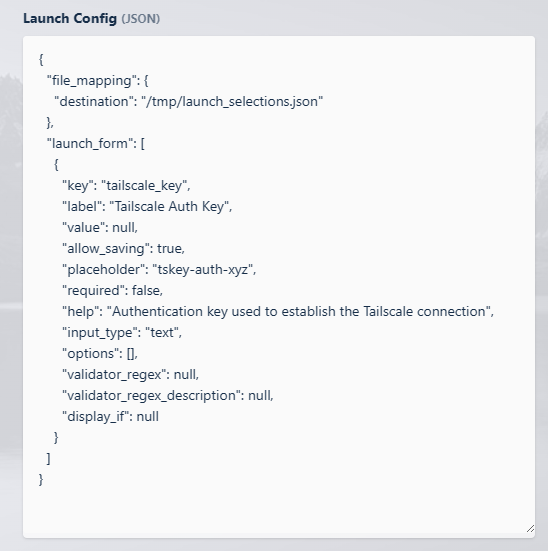
The administrator defines the form element entries in the launch_form section. The file_mapping section determines where Kasm writes the file inside the session, so the administrator's Workspace-specific initialization scripts can consume it.
{
  "file_mapping": {
    "destination": "/tmp/launch_selections.json"
  },
  "launch_form": [
    {
      "key": "tailscale_key",
      "label": "Tailscale Auth Key",
      "value": null,
      "allow_saving": true,
      "placeholder": "tskey-auth-xyz",
      "required": false,
      "help": "Authentication key used to establish the Tailscale connection",
      "input_type": "text",
      "options": [],
      "validator_regex": null,
      "validator_regex_description": null,
      "display_if": null
    }
  ]
}
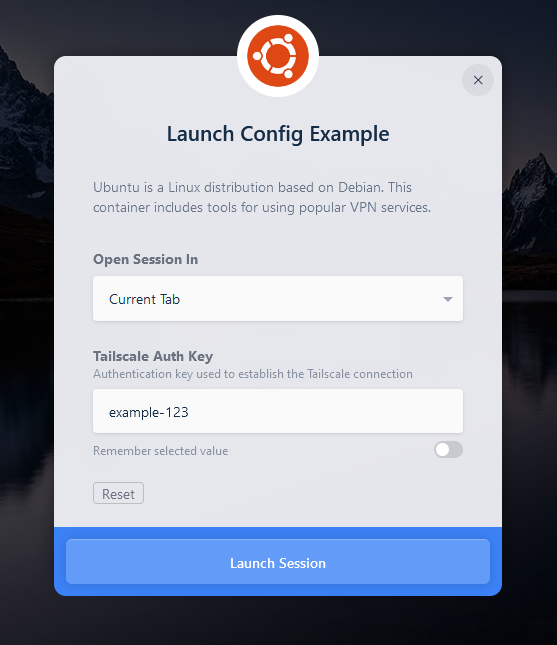
- Kasm presents the
Launch Configform to the user.
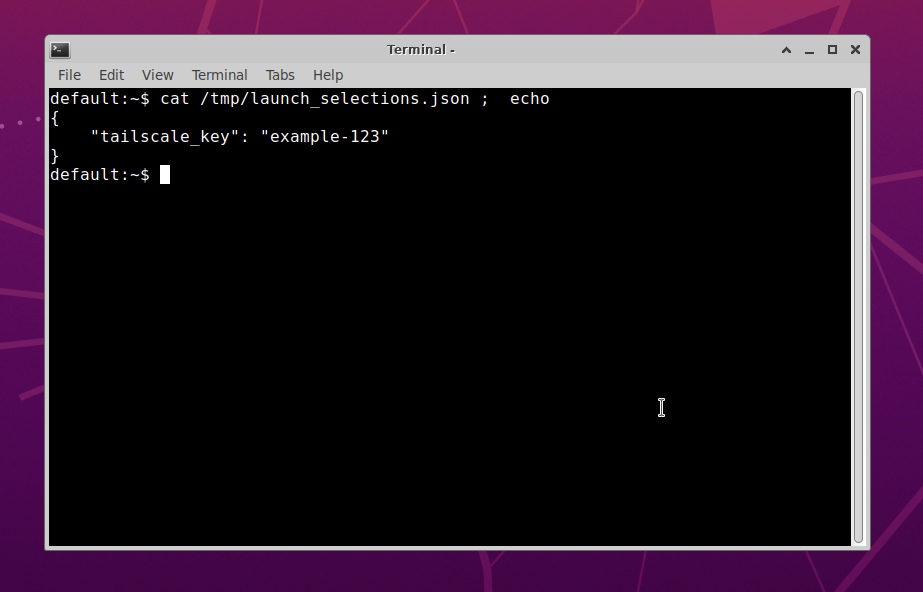
- Per the
file_mappingsection, Kasm writes a file to disk at/tmp/launch_selections.jsonwithin the session. The file contains the key and value pairs of the user's selections.
-
The administrator configures a startup script for the session that parses the user's selections from the file and acts on them. This example uses the command-line tool
jqto read the value from the selections file.#!/usr/bin/env bashset -exTAILSCALE_KEY="$(jq -r '.tailscale_key' /tmp/launch_selections.json)"tailscaled &tailscale up --authkey=${TAILSCALE_KEY}