Enable lossless encoding in Kasm Workspaces sessions
Overview
Teams that run video playback, gaming, or motion-heavy graphics inside a workspace often need pixel-perfect image quality with very low latency. This guide enables true lossless encoding in Kasm Workspaces through an installation flag, then selects quality level 5 Lossless in a session. Lossless encoding delivers near 60fps streaming on a local network, so users get a desktop-class visual experience in the browser. The trade-off is high bandwidth and CPU use, so plan the deployment before enabling this mode in shared environments.
Prerequisites
- A Kasm Workspaces deployment running version 1.12.0 or newer.
- Access to the deployment host with permission to run
install.shorupgrade.shas root. - A local network with sufficient bandwidth. Under moderate motion at 60fps, any resolution of 1920x1080 and up will likely consume an entire gigabit connection.
- A client capable of decoding the stream. Most quad-core x86_64 CPUs produced after 2014 can sustain decoding at 1000mbps.
- A Chromium-based browser for the best experience.
Lossless encoding is disabled by default, and enabling it has consequences that can break certain configurations or integrations between Kasm and other systems. Lossless requires cross-origin isolation, which blocks requests on the page to all external sites. Enabling cross-origin isolation may break certain configurations, such as branding or referencing external images for workspace thumbnails. If you have integrated Kasm Workspaces with other systems, test enabling cross-origin isolation thoroughly in your environment.
Solution approach
This guide progresses through the following phases:
- Enable lossless encoding with the installation flag.
- Select lossless quality in a session.
- Review the technical background and trade-offs.
Detailed steps
Enable lossless encoding with the installation flag
During installation or upgrade of Kasm Workspaces 1.12.0 or newer, pass the flag --enable-lossless. For a new installation, run the following commands:
cd /tmp
curl -O https://kasm-static-content.s3.amazonaws.com/kasm_release_1.19.0.tar.gz
tar -xf kasm_release*.tar.gz
sudo bash kasm_release/install.sh --enable-lossless
For an upgrade of an existing deployment, run the following commands:
cd /tmp
curl -O https://kasm-static-content.s3.amazonaws.com/kasm_release_1.19.0.tar.gz
tar -xf kasm_release*.tar.gz
sudo bash kasm_release/upgrade.sh --enable-lossless
This sets the headers that lossless mode requires. The software detects these headers and unlocks quality level 5 Lossless for all clients connecting to this Kasm Workspaces deployment.
Select lossless quality in a session
After connecting to a workspace session, select lossless quality from the streaming controls:
- Open the sidebar and select Streaming Quality.
- Move the quality slider all the way to the right to select quality level 5 Lossless.
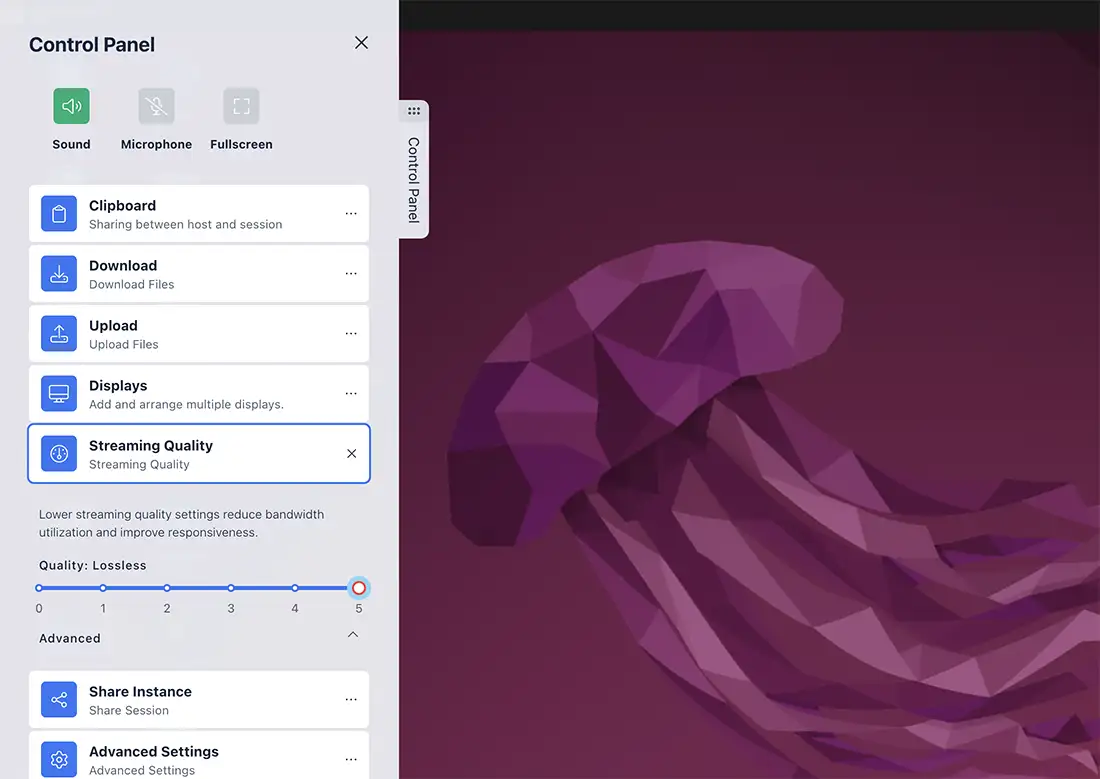
With lossless enabled, you should be able to play videos and games at near 60fps with very little latency.
Lossless mode functions on any modern web browser. The best experience comes from Chromium based browsers.
Review the technical background and trade-offs
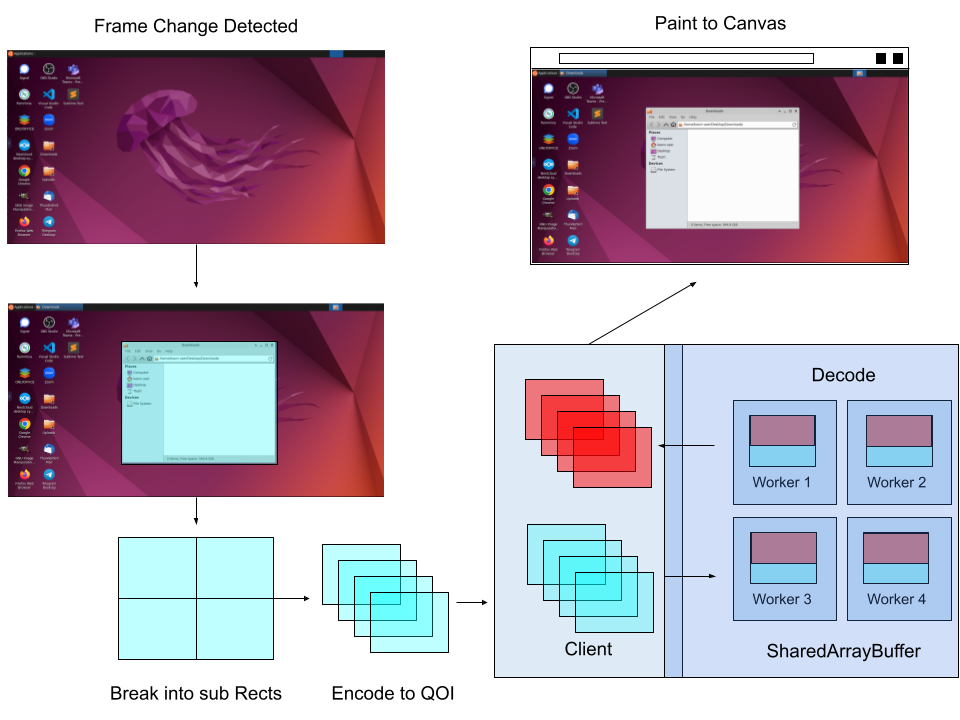
Lossless encoding uses The Quite OK Image Format, which is very fast to encode and decode. The format delivers truly lossless image compression, but no modern web browser supports it natively. Without native image decoding support, Kasm passes the VNC rect images to worker threads. The workers decode the images into raw image data that is painted to the canvas presented to the end user.
The server-side headers enable SharedArrayBuffer support, specifically known as cross-origin isolation. SharedArrayBuffer provides a high-speed, in-memory method to pass the large amounts of data back and forth from the workers to the main browser JavaScript thread for rendering. The required headers, in NGINX format, are as follows:
add_header 'Cross-Origin-Embedder-Policy' 'require-corp';
add_header 'Cross-Origin-Opener-Policy' 'same-origin';
add_header 'Cross-Origin-Resource-Policy' 'same-site';
Because decoding happens manually through WebAssembly and pure CPU work, the overhead is significant compared with native browser formats like JPEG and WebP. For comparative image delivery, lossless uses at least double the CPU and 10x the bandwidth of near-lossless JPEG. Native image formats can leverage GPU and worker threads baked into the browser for rendering DOM elements. The main advantages of this form of lossless compression are that decoding is no longer bound by a single thread and the image is truly lossless. Worker threads allow Kasm to achieve a higher framerate than native browser decoding, at the expense of bandwidth and CPU overhead.
As with anything lossless, a video or technical document cannot convey the quality and experience. Lossless is something that needs to be experienced.
Common troubleshooting steps
- Quality level 5 Lossless is unavailable in the session. Re-check the installation or upgrade settings and confirm that
--enable-losslesswas passed. The headers are set only when this flag is present. - External configurations stop working after enabling lossless. Cross-origin isolation blocks requests to external sites. Re-test integrations such as branding and external workspace thumbnail images, and host those assets within the deployment where possible.
- Streaming saturates the network or stutters. Lossless consumes all available bandwidth and is designed for local networks. Confirm gigabit-class connectivity and a client CPU capable of sustained 1000mbps decoding.